If your F350 running boards not working, the issue is often a simple settings reset or dirty hinges rather than a broken motor. These power systems default to off after a battery change, or they stop due to debris blocking the pivot points. You can usually fix this quickly without expensive parts or a trip to the dealership.
This guide shows you how to reset the auto mode, clean binding hinges, and troubleshoot electrical connections on your Ford truck. Follow these steps to restore full function to your power deployable running boards in under an hour.
Verify Power Running Board Settings After Battery Loss
A dead battery or recent replacement often causes the system to default to a disabled state. Your truck remembers this setting even after power returns, making it seem like the hardware has failed.
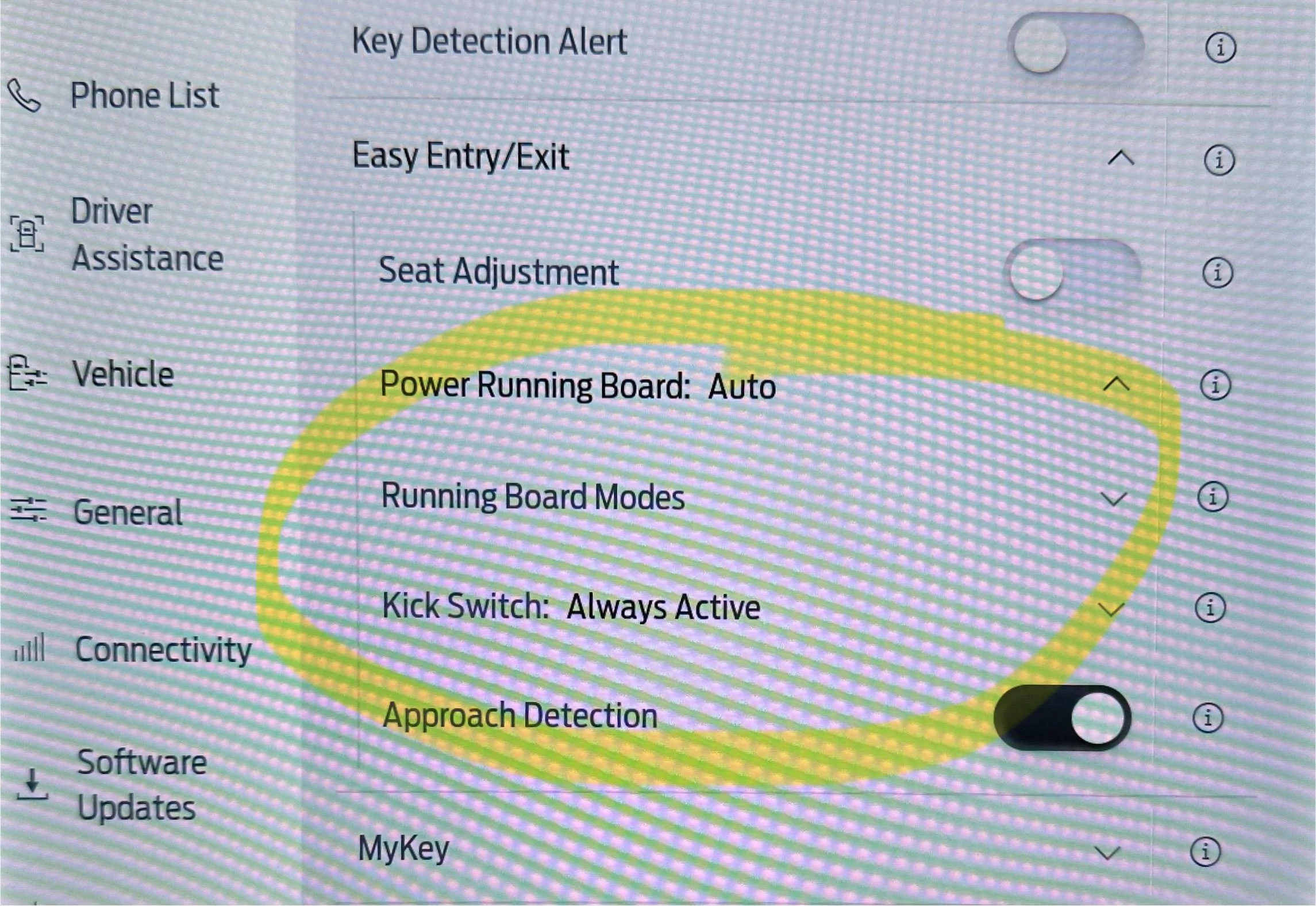
How to Reset Auto Mode in Vehicle Settings
You must manually switch the system back to automatic deployment through the infotainment screen. This single step resolves nearly all sudden failures following electrical issues.
- Tap Settings on your 8-inch Productivity Screen.
- Select Advanced Settings then choose Vehicle.
- Find Power Running Boards in the list.
- Change the status from Off to Auto.
- Exit the menu and open a door to test deployment.
Understanding Off and Out Deployment Modes
Ford provides three distinct modes that change how your boards behave during operation. Choosing the wrong one can mimic a total system failure.
- Auto: Extends boards when doors open and retracts them when closed.
- Off: Keeps boards fully retracted for off-roading or service lifts.
- Out: Holds boards extended for roof access or loading gear.
Ensure your truck is set to Auto for normal daily driving. If it is set to Off, the boards will never extend regardless of door activity.
Clean and Lubricate Binding Pivot Points
Mechanical binding from dirt and salt is the leading cause of stuttering or half-closed running boards. The system detects this resistance and stops to prevent injury or motor damage.
Identify Signs of Mechanical Binding
Look for boards that extend slowly, stop halfway, or reverse direction immediately after moving. These symptoms indicate the Smart Sense module has detected excessive load on the motor.
- Boards stop before fully extending or retracting.
- You hear grinding or straining noises from the hinges.
- Operation works only occasionally or in one direction.
Step-by-Step Hinge Cleaning Process
Regular cleaning prevents debris from locking up the four pivot pins on each hinge. Follow this routine every three to six months in harsh conditions.
- Spray hinge joints and drive shafts with a strong degreaser.
- Use a pressure washer to blast away packed mud and salt.
- Dry all joints thoroughly using compressed air to prevent rust.
- Apply penetrating oil like PB Blaster to loosen internal grime.
- Wipe away excess residue before applying fresh lubricant.
Apply Correct Lubricants for Longevity
Using the wrong lubricant attracts more dirt and creates a sludge that binds the mechanism further. Stick to products designed for high-load automotive joints.
- White Lithium Grease: Best for long-term protection and dirt resistance.
- Silicone Spray: Excellent for water resistance and smooth operation.
- Penetrating Oil: Use only for initial cleaning and loosening stuck parts.
Avoid using standard motor oil or heavy grease as these collect dust and accelerate wear on the pivot points.
Test and Clean Electrical Connectors on Motors
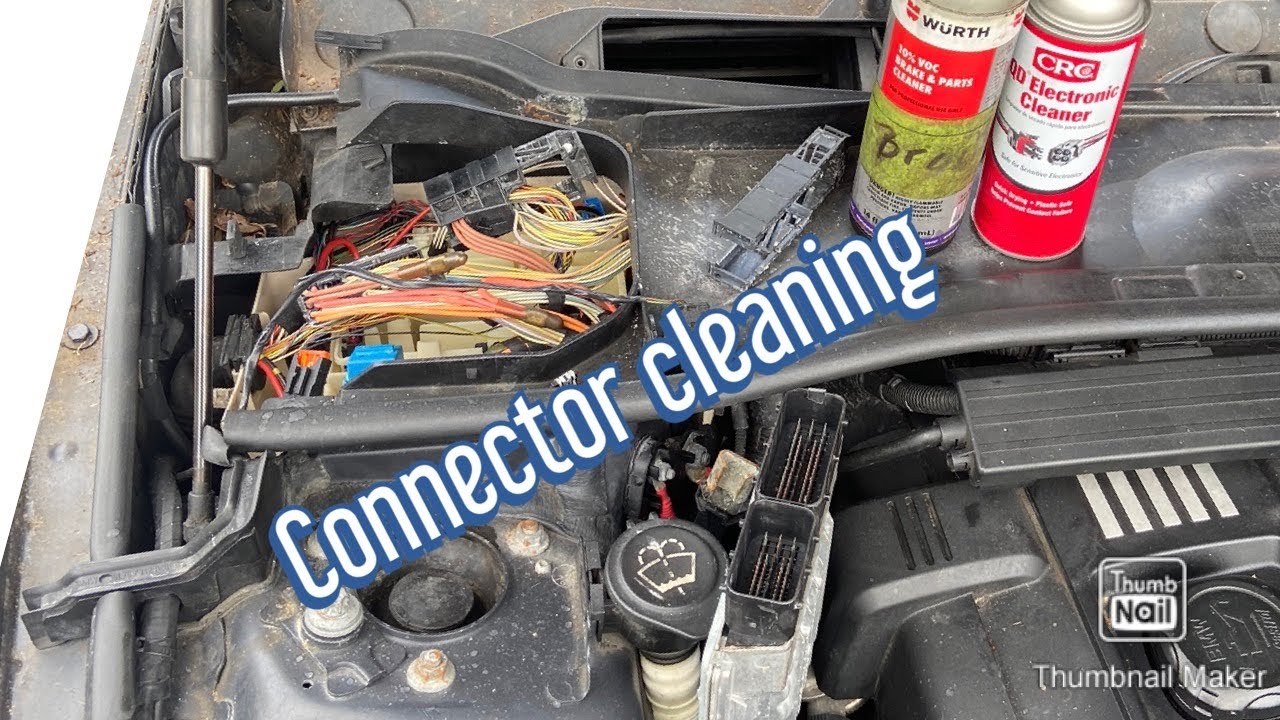
Corrosion on electrical terminals can interrupt power delivery to the motor assembly. This often happens in wet climates or after winter road salt exposure.
Locate and Access Motor Connectors
The electrical connector sits on the front hinge motor assembly near the wheel well. You may need to remove plastic shielding to access the plug safely.
- Identify the wiring harness leading to the front hinge motor.
- Gently pry open the connector housing with a small flathead tool.
- Inspect metal pins for green corrosion or white oxidation buildup.
- Spray both sides generously with electronic contact cleaner.
- Allow the connector to dry completely before reconnecting.
A thorough cleaning of these contacts often restores function without replacing any components. Never force the connector as broken plastic requires full harness replacement.
Understand Smart Sense Safety Logic
The Smart Sense module monitors motor current to detect obstructions during operation. It stops the boards if resistance spikes, thinking a foot or rock is in the way.
Why Boards Stop or Reverse Automatically
Your running boards are designed to halt immediately if they encounter unexpected resistance. This safety feature prevents injury to passengers and damage to the mechanism.
- Dirty hinges create false obstruction signals.
- Ice or snow buildup triggers the safety stop.
- Bent hinges from off-road use increase motor load.
Never assume the motor is broken when the boards stop mid-cycle. The system is likely protecting itself from a perceived threat.
Diagnose Based on Board Behavior
Specific symptoms point directly to the underlying cause of your F350 running boards not working. Use these clues to target your repair efforts effectively.
- No movement at all: Check settings and fuses first.
- Stuttering motion: Clean and lubricate pivot points immediately.
- One side fails: Inspect the drive shaft and local connectors.
- Delayed response: Test battery voltage and terminal cleanliness.
Verify Door Sensor Signals and Power Supply
Door ajar sensors trigger the entire deployment sequence. If the truck does not know a door is open, the boards will remain retracted.
Check Door Ajar Sensor Function
Test each door individually to see if the corresponding board responds. If one side works but the other does not, the issue may be isolated to a specific door sensor.
- Open each door slowly while watching board reaction.
- Unlock the truck with the key fob to test remote deployment.
- Inspect wiring harnesses near door jambs for damage.
Ensure Adequate Battery Voltage
Weak battery voltage can prevent motors from generating enough torque to deploy the boards. If your truck struggles to start, charge or replace the battery before diagnosing the running boards.
Replace Motor Gearbox Only as Last Resort

Motor failure is rare compared to maintenance issues like dirty hinges or bad settings. Most owners replace motors unnecessarily when a simple cleaning would suffice.
When Motor Replacement Is Necessary
Only consider replacing the motor gearbox if all other troubleshooting steps fail. You should verify settings, clean hinges, and check connectors before ordering parts.
- Settings are confirmed to be on Auto.
- Hinges are clean, dry, and properly lubricated.
- Electrical connectors are free of corrosion.
- Multimeter tests show no power reaching the motor.
OEM motors integrate best with the Smart Sense logic, though aftermarket options exist. Consider replacing both sides if one fails to ensure balanced performance and longevity.
Prevent Future Running Board Failures
Consistent maintenance prevents most common issues with power deployable running boards. A simple schedule keeps your system operating smoothly for years.
Establish a Regular Maintenance Schedule
Clean your running board hinges every three to six months if you drive in salt or gravel conditions. Annual cleaning is sufficient for trucks kept in mild environments.
- Wash hinges with degreaser after muddy trips.
- Dry joints with compressed air to prevent freezing.
- Reapply white lithium grease after every cleaning.
Use Off Mode for Off-Road Driving
Switch your running boards to Off mode before hitting rough trails or entering a service lift. This prevents accidental deployment that can bend hinges or burn out motors against obstacles.
Frequently Asked Questions About F350 Running Boards
Why did my running boards stop working after a battery change?
The system defaults to Off mode when power is lost to prevent accidental deployment. You must manually reset it to Auto in the vehicle settings menu under Advanced Settings.
How often should I lubricate my power running board hinges?
Lubricate hinges every three to six months in harsh conditions like snow or gravel roads. Annual lubrication is sufficient for trucks driven primarily on paved roads in dry climates.
Can I use WD-40 to lubricate my running board pivots?
WD-40 is a water displacer and cleaner, not a long-term lubricant. Use it to dry joints, but apply white lithium grease or silicone spray for lasting protection against binding.
What causes my running boards to stutter or reverse direction?
Stuttering usually means the Smart Sense module detected resistance from dirty or dry pivot points. Clean and lubricate the hinges to remove the obstruction signal.
Do I need to replace the motor if the boards won’t move?
Motor failure is rare and usually a last resort diagnosis. Check your settings, clean the hinges, and inspect electrical connectors before considering a motor replacement.
Key Takeaways for Fixing F350 Running Boards
Most cases of F350 running boards not working stem from simple settings resets or lack of lubrication rather than mechanical failure. Resetting the Auto mode after battery loss and keeping pivot points clean solves the vast majority of issues. Regular maintenance prevents binding and ensures your power boards operate smoothly for the life of your truck.
Start by checking your vehicle settings menu, then clean and lubricate your hinges if needed. These quick actions will save you time and money while restoring full functionality to your Ford power running boards.