

Your F-150 won’t start remotely. You press the button, the fob blinks, but nothing happens. No engine crank, no turn signal flash. Just silence. This is one of the most common complaints among Ford truck owners, especially after battery replacements or service visits. The good news is that in 90% of cases, it is not a hardware failure.
The root cause lies in Ford’s strict safety logic. The remote start system requires multiple conditions to be met simultaneously, and failure in just one will block the command. Many drivers unknowingly break the correct fob sequence by pressing remote start without locking first. Even a P0455 code from a loose gas cap can silently disable remote start. This guide covers the exact steps to fix it, how to diagnose the real cause, and what to do when the app works but the fob does not.
Decode Remote Start Failure Symptoms

Understanding what your truck is trying to tell you is the first step to fixing it. The F-150 uses visual and auditory signals to communicate why remote start failed.
No Response After Command
If pressing the remote start button does nothing, the signal is not being accepted. This could mean the fob battery is too weak to transmit, the vehicle did not receive the Lock command first, the truck is not fully locked or a door is ajar, or the key fob is inside the vehicle.
Check this first: Stand within 20 feet of the truck, ensure all doors are closed, and try the Lock then Double Press Start sequence.
Fob LED Blinks Red Twice
A red blink from the fob indicates command rejection. This is not a signal issue. It means the truck received the command but refused it due to unmet conditions. Common triggers include a Check Engine Light that is active, a hood latch sensor that thinks the hood is open, transmission not in Park, or remote start disabled in settings.
Pro tip: If both your main and spare fobs blink red, the issue is in the truck, not the fob.
Single Horn Chirp Plus Lights Flash
One chirp and flashing lights mean the command was received but one or more prerequisites were not met. This is not a fob problem. It is a system block. The truck is telling you to check the hood, transmission, or engine health.
App Works But Fob Does Not
If FordPass starts the engine but the fob fails, the remote start system is functional. The issue is isolated to fob battery strength, fob signal interference, or physical obstructions such as being in a basement or metal garage.
Time delay note: App-based starts can take up to 30 seconds to initiate. Do not assume it failed if the engine does not start immediately.
Meet Remote Start System Requirements
The F-150 will not start remotely unless every condition is satisfied. Missing just one will trigger failure.
Critical Prerequisites Checklist
The following conditions must all be met for remote start to work:
- Ignition must be OFF
- Transmission must be in Park
- All doors must be closed and locked
- Hood must be fully closed
- Brake pedal must not be pressed
- Key fob must be outside the vehicle
- Remote start must be enabled in settings
- No Check Engine Light or DTCs
- Sufficient vehicle and fob battery voltage
Failure to meet any one condition equals no remote start.
Fix Check Engine Light Blocking Remote Start

The most overlooked cause of remote start failure is an active Check Engine Light or hidden Diagnostic Trouble Code. Ford’s system disables remote start as a safety measure, even for minor issues.
Why CEL Stops Remote Start
The Powertrain Control Module prevents remote engine cranking if any DTC is active. This includes P0455 for a large EVAP leak, P0300 for random misfire, and U0100 for lost communication with ECM.
Clear DTCs with an OBD2 Scanner
Follow these steps to clear DTCs:
- Plug an OBD2 scanner into the port under the dash
- Pair with your phone and scan for codes
- Clear all stored DTCs
- Turn off the CEL
- Test remote start immediately
Result: In most cases, remote start resumes after code clearance.
Warning: If the code returns, the underlying issue needs repair. Clearing codes is a diagnostic aid, not a permanent fix.
Restore Function After Battery Replacement
Replacing the truck battery often disables remote start due to system resets or phantom DTCs.
Why Battery Change Breaks Remote Start
The battery disconnect can cause the Body Control Module to lose configuration, the remote start setting to reset to disabled, temporary DTCs to be logged, and one-touch windows and fob sync to fail.
Reset the Electrical System
Follow these steps to reset the system:
- Turn off the vehicle
- Disconnect the positive battery terminal
- Wait 5 to 10 minutes to reset the BCM, PCM, and security modules
- Reconnect the terminal
- Re-enable one-touch windows by holding the switch up after closure until a click is heard
- Test remote start
Fix Key Fob Issues
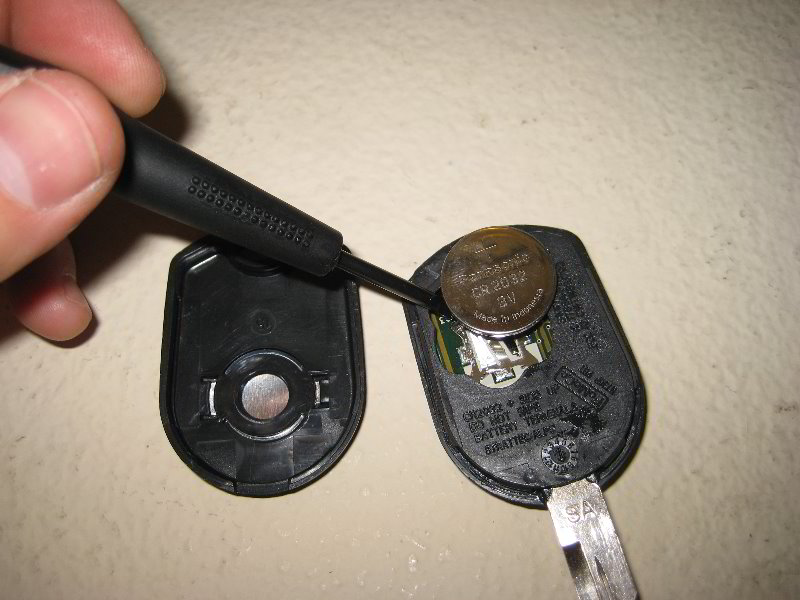
Even if lock and unlock work, the fob may fail remote start due to weak signal or sync loss.
Replace and Clean Fob Battery
Use a CR2032 battery and replace both fobs, even if one seems fine. Clean internal contacts with isopropyl alcohol and a cotton swab. Test fob range, which should work up to 260 feet in open space.
Mechanic tip: Weak fob batteries often allow lock and unlock but fail remote start due to higher power demand.
Reprogram or Resync Fob
After battery replacement, fobs can lose sync. Try sitting in the driver seat, pressing and holding Lock and Remote Start buttons for 10 seconds, then releasing and testing. If unresponsive, the fob may need dealer reprogramming.
Correct the Remote Start Button Sequence
This is the number one user error. Pressing remote start without locking first will trigger rejection.
Use the Right Three-Step Sequence
Follow these steps:
- Press the Lock button, even if the truck is already locked
- Immediately press the Remote Start button twice
- Wait for confirmation, which includes headlights flashing and engine cranking in 3 to 5 seconds
Why Lock First: It is a security feature. Ford requires a locked signal before allowing remote engine start.
Alternative Sequences That Work
Some users report that Lock times two, then Remote Start once works on 2015 to 2017 models. Repeating the sequence can extend the 10-minute default runtime.
Inspect Hood Latch Sensor
A faulty or dirty hood latch sensor can falsely report the hood as open, blocking remote start.
Diagnose Hood Sensor Issues
Follow these steps to diagnose:
- Manually close and re-latch the hood
- Listen for a solid click
- Clean the latch mechanism with electrical contact cleaner
- Lubricate with dielectric grease, not WD-40
- Inspect wiring for damage near the sensor
Verify Remote Start Settings
Remote start must be manually enabled in the instrument cluster, even if it worked before.
Enable Remote Start in Vehicle Settings
Follow these steps:
- Turn ignition to ON without starting the engine
- Press Settings on the instrument cluster
- Navigate to Vehicle then Remote Start
- Ensure it is turned ON
- Set runtime to 5, 10, or 15 minutes
- Configure climate preferences
If grayed out: A DTC or BCM-level disable is active and requires dealer intervention.
Use FordPass App for Diagnosis
The FordPass app can help isolate fob versus system issues.
Test App-Based Remote Start
Follow these steps:
- Open FordPass app
- Ensure vehicle has cellular or Wi-Fi signal
- Tap Remote Start
- Wait up to 30 seconds for engine to crank
- Watch for yellow lights in headlights, which indicate climate system activation
What App Success Tells You
If the app starts the truck, the remote start system is functional. The issue is likely fob-related. Focus on fob battery, signal, or programming.
Model-Specific Remote Start Issues
Some F-150 models have unique quirks affecting remote start.
2015 F-150 502A Package
Some 502A-equipped models lack remote start or have it disabled. Check your window sticker for the Remote Start listing.
2021 Plus F-150 PowerBoost Hybrid
App-based start works, but fob fails consistently. Possible causes include fob battery weakness, hybrid system interference, or a software bug. This requires a software update or fob resync at the dealer.
Perform a Full System Reset
When troubleshooting fails, a deep reset clears glitches and restores function.
Battery Disconnect Reset
Follow these steps:
- Turn off vehicle and remove key
- Open hood and locate battery
- Disconnect positive terminal
- Wait 5 to 10 minutes to drain capacitors and reset modules
- Reconnect terminal and tighten
- Close hood
- Re-enable one-touch windows
- Test remote start
When to Visit the Dealer
If all else fails, professional diagnostics may be needed.
Dealer Fixes You Cannot Do
Dealers can reprogram key fobs or BCM, update PCM or telematics software, diagnose module communication faults, and replace faulty remote start modules or smart junction boxes.
Bring your OBD2 scanner data to prove the issue is code-related, not mechanical.
Prevent Future Remote Start Failures
Avoid repeat issues with these simple habits.
Proactive Maintenance Tips
Replace fob batteries every 1 to 2 years. Keep an OBD2 scanner in your glovebox. Check for DTCs after any service. Verify remote start is enabled after battery work. Clean hood latch sensor every 6 months. Update vehicle software via OTA or dealer.
Best practice: After any repair, test remote start before leaving the shop.
Frequently Asked Questions About F-150 Remote Start
Why does my F-150 remote start not work after changing the battery?
Battery replacement often resets the Body Control Module and disables remote start. Disconnect the positive terminal for 5 to 10 minutes, then re-enable remote start in your vehicle settings.
What is the correct sequence to remote start my F-150?
Press the Lock button first, then press the Remote Start button twice. The truck must receive the lock signal immediately before the start command.
Can a Check Engine Light prevent remote start?
Yes. Any active Check Engine Light or DTC will disable remote start as a safety measure. Use an OBD2 scanner to clear codes and test again.
Why does my fob blink red when I press remote start?
A red blink means the command was rejected. Check for an active Check Engine Light, ensure all doors are closed and locked, and verify the hood latch sensor is engaged.
Does the FordPass app work when the key fob fails?
If FordPass starts the engine but the fob does not, the remote start system is functional. Replace the fob battery or check for signal interference.
How do I enable remote start if it is grayed out?
If remote start is grayed out in settings, a DTC or BCM-level disable is active. Scan for codes with an OBD2 scanner or visit a dealer for advanced diagnostics.
Key Takeaways for Fixing F-150 Remote Start
The F-150 remote start not working issue is rarely a dead module. It is usually a missed condition, a hidden code, or incorrect fob use. Start by checking for the Check Engine Light and using the correct Lock then Double Press Start sequence. Keep an OBD2 scanner handy to clear DTCs that silently disable remote start. Replace fob batteries every 1 to 2 years, and always verify remote start is enabled in your vehicle settings after any battery work. Following these steps will restore function in minutes, not hours. Keep this guide handy, and never get stranded by a silent fob again.


