
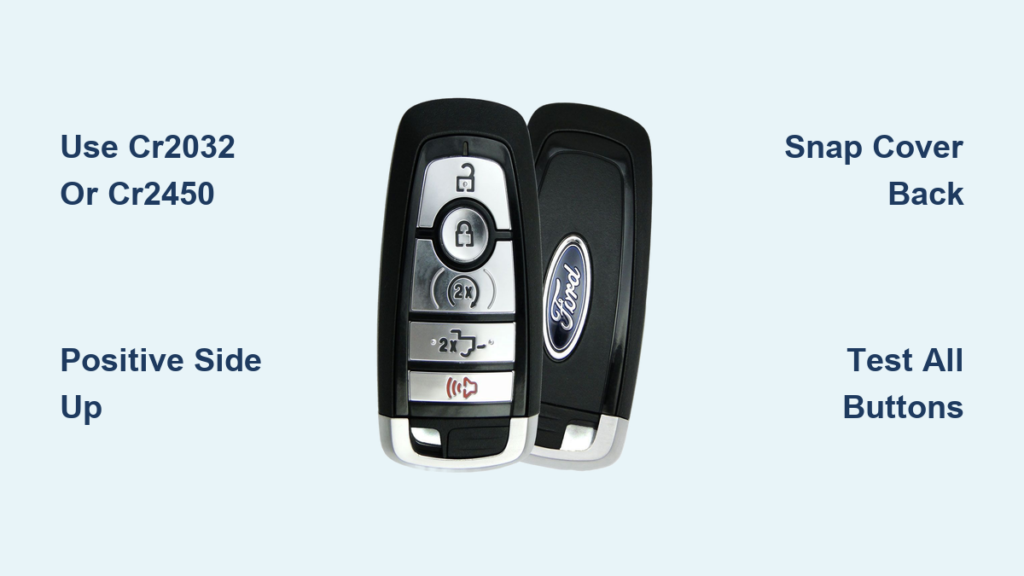
Is your Ford F-150 key fob suddenly unresponsive? You press Lock or Unlock, but nothing happens—no beep, no flash, no action. If you’re dealing with weak signals, delayed responses, or a complete failure to start remotely, the culprit is likely a dying battery. The good news is that replacing the battery in your Ford F-150 key fob is a fast, simple DIY task that takes less than five minutes and costs just a few dollars. Whether you drive a 2011 XL or a 2025 Platinum, this guide walks you through every step, from identifying the correct battery type to testing full functionality afterward.
No reprogramming is needed, no special tools are required, and this article provides clear, proven steps to get your key fob working like new. You’ll learn exactly which battery your truck needs, how to open the fob safely, and what to do if something goes wrong during the replacement process.
Confirm Your Key Fob Battery Type

Before opening the fob, you need to identify the correct replacement battery. Using the wrong type leads to poor contact or complete failure.
CR2032 for Most F-150 Models
The CR2032 is the standard battery for most Ford F-150 key fobs from 2011 through 2025. It is a 3V lithium coin cell measuring 20mm in diameter and 3.2mm thick. You will find it in XL, XLT, and many Lariat trims. Always check the label on the old battery when replacing it, but if you are preparing ahead, CR2032 is your safest bet.
Reputable brands like Energizer, Duracell, Panasonic, or Sony ensure reliable performance and longer lifespan. Avoid off-brand batteries that may fail early. The CR2032 is sold in multi-packs for around $5 at retailers like Amazon, AutoZone, or O’Reilly Auto Parts.
CR2450 for High-End Trims
Some 2015+ F-150 models, especially King Ranch, Platinum, and Raptor trims, use a CR2450 battery. This battery is slightly larger at 24.5mm diameter and 5.0mm thick, offering higher capacity for fobs with advanced features. While both are 3V, they are not interchangeable.
A CR2450 will not fit in a CR2032 compartment, and a CR2032 may rattle or fail to make contact in a CR2450 housing. If you are unsure which battery your fob uses, consult your owner’s manual or remove the fob back to verify the old battery type.
Pro Tip: When in doubt, bring the old battery to an auto parts store or use your VIN at a Ford dealership to confirm the correct type.
Recognize Key Fob Battery Failure Signs
Do not wait until you are locked out. Knowing the early warning signs of a weak battery helps you replace it before problems occur.
Common Low-Battery Symptoms
Watch for these indicators that your key fob battery is dying.
• No response when pressing Lock, Unlock, or Panic
• Reduced range, where the fob only works within 1 to 3 feet of the truck
• Delayed activation of Remote Start or door locks
• Intermittent function, where the fob works sometimes and fails others
• Dashboard warning on 2015+ models displaying “Key Fob Battery Low” on the instrument cluster
Note: 2011 through 2014 models typically fail without warning. If your fob stops working suddenly, battery replacement is the first troubleshooting step you should try.
Remote Start Will Not Engage
Before assuming a deeper issue, test the battery. Many owners report Remote Start failure due to low power, even if Lock and Unlock still work. Replace the battery first, then retest the Remote Start function. If it still fails, check your vehicle settings by going to Settings, Remote Start on your dashboard and ensuring the feature is enabled.
Gather Tools and Supplies
You likely have everything you need at home. No special kit is required for this repair.
Essential Items
You will need these items to complete the replacement.
• Replacement battery (CR2032 or CR2450, depending on your model)
• Flat-head screwdriver (3.0mm) or plastic pry tool
• Mechanical key (built into the fob)
• Cotton swab and isopropyl alcohol (optional, for cleaning)
Best Practice: Use the mechanical key as your opening tool. It fits perfectly into the fob’s seam and prevents scratches on the plastic housing. Coins, butter knives, or guitar picks work in a pinch, but apply minimal pressure to avoid cracking the casing.
Optional but Helpful
These items are not required but can make the job easier.
• Microfiber cloth to clean contacts
• Spare battery for future use
• Small container to hold the old battery (prevents loss or improper disposal)
Open the Key Fob Safely
The opening method depends on your F-150 model year and fob design. Follow the steps that match your vehicle.
2011–2014 Models: Pry at the Side Gap
Hold the fob with the Ford logo facing up. Locate the thin gap along the long edge, opposite the key protrusion. Insert a quarter or flat-head screwdriver into the gap. Gently twist to pop apart the two plastic halves.
The case is held by plastic clips, not screws. Apply steady, light pressure. Forcing it may crack the housing and damage the internal electronics.
2015+ Models: Use the Logo Notch or Key Slot
Flip out the mechanical key from the side. Turn the fob so the Ford logo faces up. Find the small notch near the logo or on the side opposite the key release. Insert a plastic tool or flat screwdriver into the notch. Gently twist to release the back cover. It will snap off with an audible click.
Alternative Method for CR2450 Fobs: Insert the ejected mechanical key into the larger gap on the back and twist gently. It acts as a lever to pop open the cover more easily.
Remove the Old Battery
Once the back is off, the battery compartment is exposed and ready for service.
Locate and Extract the Battery
The battery sits in a shallow metal or plastic holder. If it is loose, tilt the fob to let it fall out into your hand. If it is secured, use a fingernail or flat tool to pry from the top edge and lift it out.
Inspect for Damage: Look for white powder, corrosion, or leakage around the battery compartment. If any of these are present, clean the contacts with a cotton swab dipped in isopropyl alcohol. Let the compartment dry completely before installing the new battery.
Install the New Battery Correctly

Orientation is critical. Install the battery wrong, and the fob will not work at all.
CR2032: Positive Side Up
Insert the positive (plus) side facing up. This is the side with the brand name and CR2032 printed on it. Slide it under the retaining lip or press down until it clicks into place. Ensure it is fully seated and does not rattle.
CR2450: Align with Retaining Hooks
Insert the angled edge first, then press down. The battery must rest under the two small hook hinges at the bottom of the compartment. Verify it is flush and secure before closing the fob.
Fit Check: A loose battery means incorrect type or poor seating. Double-check the battery type and orientation before reassembling the fob.
Reassemble the Key Fob
Putting it back together is just as important as taking it apart. A poor fit can cause buttons to stick or the battery to lose contact.
Snap the Cover Back On
Align the back cover with the front housing. Press firmly around all edges until it snaps securely into place. For CR2450 models, reinsert the mechanical key until it clicks.
Final Check: The cover should be flush with no gaps. If it does not close easily, reopen and verify the battery is seated correctly and not blocking the housing.
Reinstall the Rubber Gasket (If Present)
Some high-end fobs have a thin rubber seal around the battery compartment. Make sure it is properly seated before closing. This helps maintain splash resistance and protects against dust and moisture.
Test the Key Fob Immediately
Do not assume it works. Verify every function to ensure the replacement was successful.
Step-by-Step Function Test
Stand 5 to 10 feet from your F-150. Press Lock. The doors should lock, lights should flash, and the horn should beep if enabled. Press Unlock. The doors should unlock. Press Panic. The alarm should activate. Test Remote Start by double-tapping Lock or using the dedicated button. The engine should start within seconds.
Success: Immediate, full response across all buttons means the job is done correctly.
Troubleshoot If It Fails
If the fob does not respond after replacement, reopen and check these items.
• Battery orientation (positive side must face up)
• Battery fully seated with no rattling
• Contacts clean and undamaged
• Try a second new battery, as some batteries are defective from the factory
• Ensure Remote Start is enabled in your vehicle settings
Avoid Common Replacement Mistakes
Even simple jobs can go wrong. Steer clear of these frequent errors to ensure success.
Installing Battery Upside Down
The most common mistake is placing the battery with the negative side up. The positive side must face up for the fob to function. If installed incorrectly, the fob will not work at all.
Using CR2025 Instead of CR2032
CR2025 batteries are thinner (2.5mm vs. 3.2mm) and may not make proper contact. They might fit physically, but performance is unreliable. Stick with CR2032 or CR2450 as specified for your model.
Forcing the Cover Closed
If the back will not snap shut, do not force it. Misaligned batteries or damaged clips can cause resistance. Reopen, realign everything, and try again. Forcing it can crack the housing.
No Reprogramming Needed
A major advantage of Ford F-150 key fobs is that they retain all programming after battery replacement. Unlike some vehicles, Ford does not require re-pairing or syncing.
No buttons to hold, no ignition cycles, no dealership visit required. Simply replace the battery and test. The fob should work immediately upon installation.
Extend Battery Life with Smart Habits
Maximize the lifespan of your new battery by following these care guidelines.
Average Lifespan: 2–4 Years
Battery life varies based on usage and environment. Frequent Remote Start use drains the battery faster. Extreme heat or cold reduces performance. Moisture exposure, if the seal is damaged, can cause corrosion.
Pro Tip: Replace every 3 years as preventive maintenance, especially before winter trips or long hauls.
Store Spares Properly
Keep extra batteries in a cool, dry place. Avoid glove compartments or dashboards where heat builds up. Never store loose batteries in pockets with metal objects, as short circuits can cause leaks.
Final Verification Checklist
Before calling the job done, run through this quick list.
• Correct battery type confirmed (CR2032 or CR2450)
• Positive (+) side facing up
• Battery fully seated with no rattling
• Back cover snapped securely in place
• Mechanical key reinserted and clicks
• Rubber gasket properly seated (if equipped)
• All buttons tested and responsive
• Remote Start functions (if applicable)
Key Takeaways for Ford F-150 Key Fob Battery Replacement
Replacing the battery in your Ford F-150 key fob is one of the easiest and most cost-effective maintenance tasks you can perform. With the right battery (CR2032 for most models or CR2450 for high-end trims) and a few minutes of your time, you restore full remote functionality and avoid the hassle and cost of a dealership visit.
The process requires no reprogramming, no special tools, and no prior experience. Simply identify your battery type, open the fob carefully, install the new battery with the positive side facing up, reassemble, and test. Watch for common mistakes like installing the battery upside down or using the wrong size, and handle the plastic housing gently to avoid cracking.
Whether you drive a basic XLT or a premium Raptor model, this simple fix keeps your truck secure, convenient, and ready to go. Replace the battery proactively every 3 years to prevent unexpected lockouts and ensure reliable Remote Start performance.
Frequently Asked Questions About Ford F-150 Key Fob Battery Replacement
What battery does a 2018 Ford F-150 key fob use?
Most 2018 Ford F-150 key fobs use a CR2032 battery. However, higher trims like Lariat, King Ranch, Platinum, and Raptor may use a CR2450. Check the old battery or consult your owner’s manual to confirm.
How do I know if my Ford F-150 key fob battery is low?
Signs include no response when pressing buttons, reduced range (only works within a few feet), delayed responses, intermittent function, or a “Key Fob Battery Low” warning on the dashboard (2015+ models). Older models often fail without warning.
Do I need to reprogram my Ford F-150 key fob after replacing the battery?
No. Ford F-150 key fobs do not require reprogramming after battery replacement. The fob retains all programming and should work immediately once the new battery is installed correctly.
How long does a Ford F-150 key fob battery last?
The average lifespan is 2 to 4 years. Factors that reduce battery life include frequent Remote Start use, exposure to extreme temperatures, and moisture damage to the fob.
Can I use a CR2025 battery in my Ford F-150 key fob?
No. CR2025 batteries are thinner (2.5mm vs. 3.2mm) and may not make proper contact. Always use CR2032 or CR2450 as specified for your model to ensure reliable performance.


