
If your F-150 isn’t starting like it used to, or your Lightning’s range seems off, the issue might lie in battery health. Unlike smartphones or laptops, Ford doesn’t display a simple battery life percentage on most F-150 models. Whether you drive a gas-powered workhorse, a PowerBoost hybrid, or an all-electric Lightning, checking true battery life requires more than glancing at the dashboard.
The challenge is that Ford’s factory interface hides critical metrics. Gas models show no 12V battery health. PowerBoost hybrids give only visual hints about hybrid battery charge. Even the Lightning, with its massive 131 kWh pack, doesn’t show State of Health in the cluster. But that doesn’t mean you’re in the dark. With the right tools and methods, you can accurately assess 12V, hybrid, and high-voltage battery performance across all F-150 variants.
Access Hidden 12V Battery Data on Gas F-150

Use Engineering Mode
On many F-150s from 2021 onward, Ford includes a hidden diagnostic screen that reveals actual 12V battery health without any tools needed.
How to Activate Engineering Mode:
- Sit in the driver seat with all doors closed.
- Turn the ignition OFF.
- Press and hold the trip odometer reset button.
- While holding, turn the ignition to ON (do not start the engine).
- Keep holding until diagnostic data appears on the screen.
- Use the reset button to scroll through different readings.
What You’ll See in Engineering Mode:
- Battery State of Charge percentage
- Cranking voltage (the lowest voltage during engine start)
- Charging system voltage (alternator output)
- Diagnostic Trouble Codes related to the charging system
Warning: If cranking voltage drops below 10.5V, your battery may fail soon. Healthy AGM batteries should stay above 11.5V during startup.
Exit engineering mode by turning the ignition off and then back on normally.
Read Voltage via Instrument Cluster
Newer 2024 and newer F-150s offer a built-in voltage readout, though it’s limited in precision.
Steps to Access Battery Voltage:
- Press Settings on the steering wheel controls.
- Navigate to Instrument Cluster.
- Select Measurements.
- Scroll to Battery Voltage.
Limitations of This Method:
- Displays only whole volts (e.g., 12.0V, 13.0V)
- Cannot distinguish between 12.4V (50% charged) and 11.6V (discharged)
- Updates slowly and may not reflect real-time load conditions
This method works best as a quick check rather than a diagnostic tool.
Test 12V Battery with Tools

Use a Digital Multimeter
For the most accurate 12V battery check, go directly to the source with a digital multimeter.
Steps for Accurate Testing:
- Turn off the truck and wait 1 to 2 hours (allows surface charge to dissipate).
- Set your multimeter to DC voltage (20V range).
- Touch the red probe to the positive terminal and black probe to the negative terminal.
- Read the voltage immediately.
Voltage Reading Guide:
| Voltage Reading | Charge Level | Battery Condition |
|---|---|---|
| 12.6V or higher | 100% | Fully charged (AGM) |
| 12.4V | Approximately 75% | Good condition |
| 12.2V | Approximately 50% | Recharge recommended |
| 12.0V or lower | 40% or less | At risk of sulfation |
| Below 11.9V | Less than 25% | May not start the engine |
Pro Tip: AGM batteries degrade faster when deeply discharged. Keep your battery above 12.4V for optimal longevity.
Install an OBD2 Battery Monitor
Bluetooth OBD2 adapters like the ELM327 paired with Torque Pro or ForScan give real-time 12V data with logging capabilities.
Data Available Through OBD2:
- Battery voltage in real time
- Current draw (parasitic drain)
- Battery temperature
- Charging system status
Setup Tips for OBD2 Monitoring:
- Use Torque Pro with custom PID setup for Ford-specific data.
- Enable logging to track voltage trends over days or weeks.
- Set alerts for low voltage or abnormal drain patterns.
One user caught a module staying awake after shutdown, draining the battery from 12.6V to 11.2V overnight thanks to OBD2 monitoring.
Monitor 12V via FordPass App
Some F-150 owners, especially Lightning drivers, can see 12V battery state in the FordPass web portal.
What You Might See in FordPass:
- 12V battery percentage (some users report seeing 91% charged)
- Charging status and alerts
- Low battery warnings
Note: Availability varies by model year and account sync. Not all users report seeing this data consistently.
If visible, it’s a convenient remote check, but it’s still not a substitute for direct voltage testing with a multimeter.
Check PowerBoost Hybrid Battery Health
Understand EV Coach Display Limits
The PowerBoost shows electric driving via a blue energy flow bar in the EV Coach screen on the infotainment system.
What the EV Coach Tells You:
- Blue bar indicates driving on electric power
- Bar shrinks as the hybrid battery depletes
- Engine starts automatically when SoC hits approximately 40% to 50%
What the EV Coach Does Not Tell You:
- No percentage readout for hybrid battery
- No kWh capacity display
- No battery health or degradation data
Frustration Point: Many owners report Ford collects this data but doesn’t display it in the user interface.
Use OBD2 Apps to See Hybrid SoC
With an ELM327 adapter and Torque Pro or ForScan, you can access real hybrid battery metrics that Ford hides.
Steps to Access Hybrid Battery Data:
- Pair your OBD2 adapter with your phone or tablet.
- Open Torque Pro or ForScan.
- Add custom PIDs for PowerBoost specific data including Hybrid Battery SoC percentage, battery voltage, current flow in and out, and temperature readings.
One user recorded 42% SoC before engine engagement, confirming normal hybrid operation with this method.
Diagnose Hybrid Battery Degradation
Warning Signs to Watch For
| Symptom | Likely Issue |
|---|---|
| Less electric-only driving time | Reduced hybrid battery capacity |
| Engine starts at 60% SoC | BMS miscalibration or cell failure |
| Poor fuel economy | Inefficient hybrid cycling |
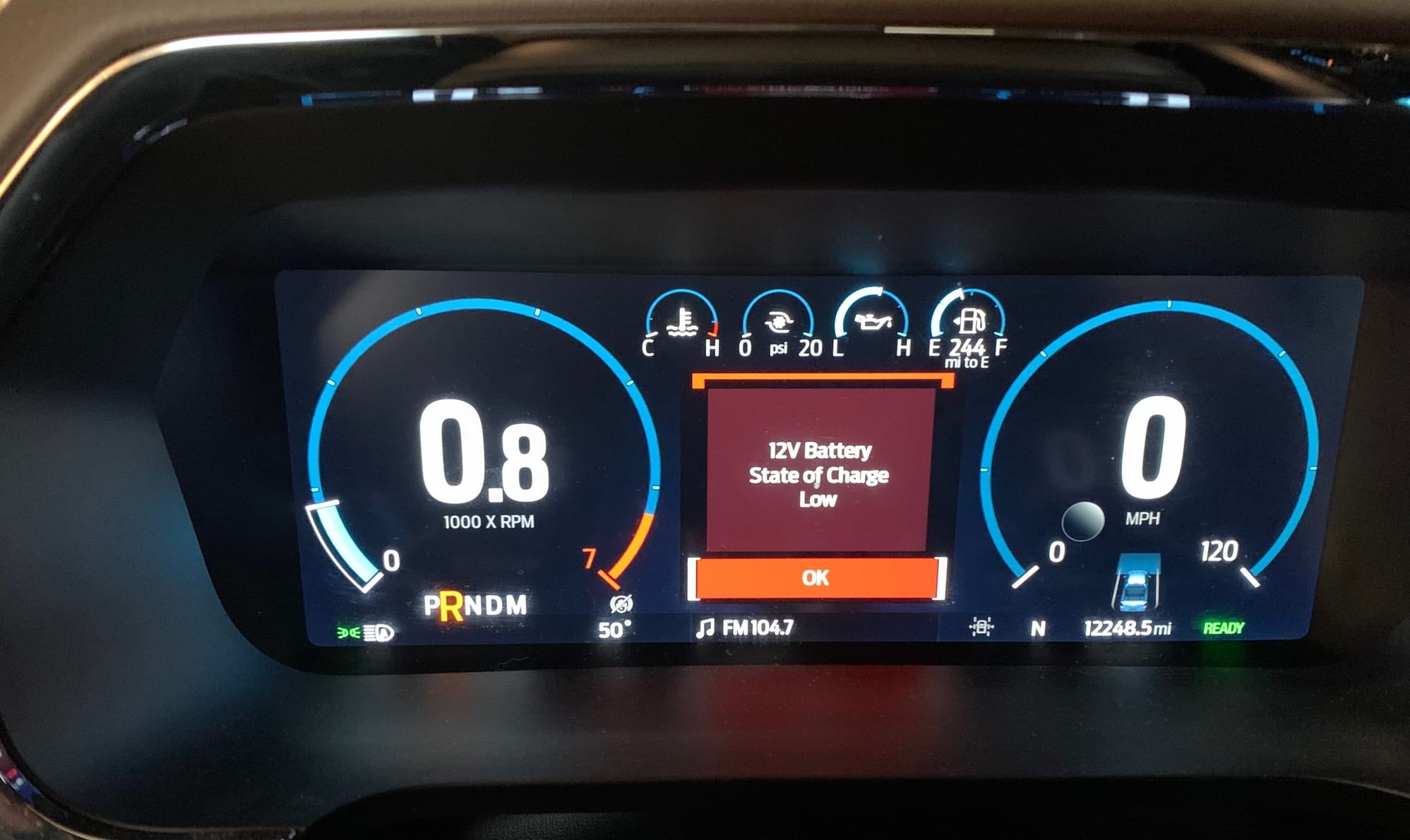
| Check Hybrid System warning light | Active DTCs or module fault |
Action Step: If you see warning lights, scan for diagnostic trouble codes using ForScan to identify the specific issue.
Estimate Lightning Battery Health
Perform a Trip-Based SOH Check
You don’t need special tools to estimate your Lightning’s battery health. A simple drive provides enough data.
Steps for Trip-Based Calculation:
- Fully charge your Lightning (or note the exact starting SoC).
- Record the starting SoC percentage, estimated range, odometer reading, and outside temperature.
- Drive 100 to 150 miles combining city and highway conditions.
- Record the final SoC percentage, miles driven, and energy efficiency.
Example Calculation:
- Driven: 166.8 km (103.6 miles)
- Efficiency: 29 kWh per 100km
- Energy used equals 166.8 divided by 100 multiplied by 29, which equals 48.37 kWh
- SoC used: 83% minus 45% equals 38%
- Usable capacity: 48.37 divided by 0.38 equals 127.3 kWh
- SOH: 127.3 divided by 131 (original capacity) equals 97.2%
This method was validated against a dealer scan showing 98%, proving the DIY approach works accurately.
Do a 5-Minute Used Buyer Check
For quick evaluation of a used Lightning, perform this spot check.
Steps for Quick Evaluation:
- Check SoC and range at 60% state of charge. Extended Range should show 180 to 190 miles. If it shows 120 miles, implied full range is 200 miles, which equals approximately 62.5% SOH a red flag.
- Look for warnings including high-voltage battery faults, power reduction messages, and charging errors.
- Ask about charging habits. Frequent 100% DC fast charging indicates higher degradation risk. Mostly Level 2 charging in the 20% to 80% range suggests better battery life.
Red Flag: A 30,000-mile Lightning with less than 70% implied range may have abnormal degradation and warrants further investigation.
Use OBD2 to Read Lightning Battery Data
Access HV Battery SOH Directly
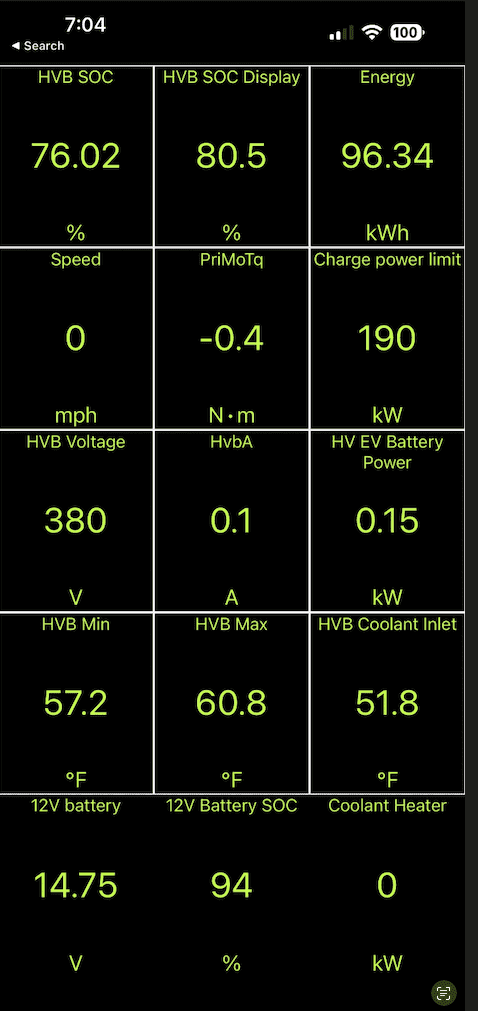
With a Ford-compatible OBD2 adapter and ForScan or EV-Coach, you can pull real BMS data directly from the vehicle.
Available Metrics Through OBD2:
- HV Battery SOH percentage (direct health readout)
- Usable energy in kWh (real-time capacity)
- Cell voltage spread (max minus min group, ideal under 30 mV)
- Battery temperature readings (core, coolant, ambient)
- DCFC session count (correlates with aging rate)
Important: Use read-only mode only. Writing to the BMS can trigger safety faults or void your warranty.
Get a Professional Battery Scan
Use Dealer or Third-Party Tools
Ford dealers use IDS (Integrated Diagnostic System) to pull complete battery reports with full diagnostic capabilities.
Data Available Through Professional Scan:
- Exact SOH percentage (e.g., 98%)
- Active and historical DTCs
- Cell module health details
- Thermal system performance
- Warranty eligibility determination
One owner’s trip-based calculation of 97% matched a dealer scan of 98%, validating both DIY methods and professional diagnostics.
Track 12V Battery in All Models
Why the 12V Battery Matters
Every F-150, whether gas, hybrid, or electric, relies on a 12V auxiliary battery for electronics, infotainment, and startup.
Critical in Lightning: A dead 12V battery disables the entire vehicle, even with a full high-voltage pack ready to go.
Common Causes of 12V Drain:
- Modules not entering sleep mode after shutdown
- Aftermarket accessories drawing power
- Cold weather increasing demand
- Infrequent vehicle use allowing discharge
Prevent 12V Failures
Best Practices for 12V Battery Longevity:
- Test voltage monthly with a multimeter.
- Install a smart charger with AGM setting for storage periods.
- Use an always-on voltage monitor (hardwired or OBD2-based).
- Avoid deep discharges. AGM batteries hate being drained below 50%.
- In cold climates, keep the battery above 12.4V.
Recharge with a smart charger like the NOCO Genius series to prevent overcharging while maintaining optimal charge levels.
Recognize Healthy vs. Failing Batteries
Signs of Healthy Battery
| Metric | Healthy Range |
|---|---|
| Lightning SOH | Above 90% after 3 years |
| Range scaling | Predictable with SoC |
| Fast charging | Reaches 150 kW, sustains to 80% |
| Cell spread | Under 30 mV |
| Battery temp | 20 to 35°C during charge |
| Warnings | No fault messages |
Early data shows approximately 1% degradation per 10,000 km, better than expected for EV batteries.
Red Flags of Degradation
| Warning Sign | Recommended Action |
|---|---|
| SOH below 70% before 100k miles | Warranty claim possible |
| Power reduction messages | Immediate diagnostic scan |
| Fast charging drops early | Check cooling system |
| Cell spread above 100 mV | Imbalance, may need service |
| Overtemp warnings | Inspect coolant and radiator |
| Inconsistent range | BMS or cell issue |
Follow Best Practices for Longevity
For All F-150 Owners
- Check 12V voltage monthly with a multimeter.
- Use OBD2 apps for trend analysis over time.
- Avoid deep discharges. Recharge before reaching 12.0V.
- In winter, keep the battery charged and warm.
For PowerBoost Drivers
- Monitor sleep mode via FordPass. It should engage within 30 minutes of shutdown.
- Use OBD2 to track hybrid SoC and efficiency over time.
- Investigate delayed sleep mode lasting over 60 minutes, which could indicate parasitic draw.
For Lightning Owners
- Charge to 80% daily. Reserve 100% for long trips only.
- Limit DC fast charging. Use Level 2 charging when possible.
- Park in shade in hot climates to reduce thermal stress.
- Schedule charging to avoid overnight 100% holds.
- Perform an annual SOH check using trip data.
Frequently Asked Questions About Checking Battery Life on F-150
How do I check my F-150 12V battery health without tools?
For 2021 and newer models, use Engineering Mode by holding the trip odometer reset button while turning the ignition to ON. This displays cranking voltage, charging system voltage, and battery state of charge. For 2024 and newer models, check Settings, then Instrument Cluster, then Measurements for battery voltage.
Does FordPass show battery health on F-150 Lightning?
FordPass shows current state of charge and estimated range, but it does not display State of Health or usable kWh. Some users report seeing 12V battery percentage in the web portal, but this varies by model year and account sync.
What voltage indicates a failing 12V battery?
A fully charged AGM battery should read 12.6V or higher. If voltage drops below 11.9V after sitting, the battery may not start the engine. During cranking, voltage should stay above 10.5V. Below 10.5V indicates a battery nearing failure.
How accurate is the trip-based SOH calculation for Lightning?
The trip-based calculation is highly accurate. One owner’s calculated 97% SOH matched a dealer scan showing 98%. Minor rounding errors exist because Lightning rounds energy consumption to whole numbers, but repeated tests under similar conditions yield reliable results.
What is the warranty coverage for F-150 Lightning battery?
Ford warranties the high-voltage battery for 8 years or 100,000 miles, guaranteeing at least 70% capacity retention. If SOH drops below 70% within the warranty period, the battery is covered for replacement.
Can I check PowerBoost hybrid battery percentage?
The factory display does not show hybrid battery percentage. Only a visual energy flow bar appears in the EV Coach. For numerical data, use an OBD2 adapter with Torque Pro or ForScan to access hybrid battery SoC, voltage, current, and temperature readings.
Key Takeaways for Checking F-150 Battery Life
While Ford keeps battery metrics hidden from the dashboard, you have multiple ways to accurately assess battery health on any F-150 variant. Gas-powered F-150 owners can use Engineering Mode or a multimeter to catch 12V battery failures before they leave you stranded. PowerBoost hybrid drivers can monitor actual hybrid battery SoC through OBD2 apps despite Ford’s limited factory display. Lightning owners can track degradation using trip-based calculations, OBD2 diagnostics, or professional dealer scans, protecting their significant investment.
The key is proactive monitoring. Test your 12V battery monthly, perform annual SOH checks on electrified models, and follow best charging practices. A Lightning with 97% capacity after three years demonstrates these batteries last when properly maintained. Stay ahead with data, not guesses, because when the battery fails, the truck stops working.


