
You press the auto-up button expecting your window to seal shut, but instead it reverses and drops halfway down. This frustrating 2024 F250 window bounce back problem has plagued owners of 2023–2024 Super Duty and F-150 models, especially higher trims like the Platinum. The window’s anti-pinch safety feature misreads normal resistance as an obstruction, triggering an unwanted reversal.
The root cause combines hyper-sensitive window switches, software calibration quirks, and occasional mechanical friction. While it feels like a hardware failure, most cases resolve with precise reset procedures or a dealer software update. Ignoring the issue risks recurring frustration and premature motor strain. The good news? You don’t always need a dealership visit. With proper timing and technique, you can often restore full function in under five minutes.
This guide walks you through proven fixes, from DIY recalibration to professional diagnostics, so you can stop fighting your windows and get back to driving.
Decode the Bounce Back Symptoms
Understanding what your window is trying to tell you is the first step to fixing it. The 2024 F250 window bounce back isn’t random. It follows predictable patterns tied to switch logic and safety programming.
False Obstruction Triggers the Reversal
When you press auto-up and the window reverses before sealing, the system isn’t broken. It’s overly cautious. The control module detects unexpected resistance during ascent and defaults to safety mode, rolling the window down to prevent injury or damage. This false trigger can stem from:
- Slight track binding due to cold weather or dried lubrication
- A worn regulator increasing drag
- Improper calibration after a battery reset or power interruption
Even minor friction can fool the system, especially in newer models where sensitivity has been increased for safety compliance.
Intermittent Failures Point to Calibration Drift
If the bounce back happens only sometimes, such as on hot days or after using the manual half-press, the calibration has likely drifted. The system forgets the full travel path and misjudges where resistance should occur. This is often fixable with a full recalibration cycle.
Pro Tip: If one window works fine but others bounce back, focus on the faulty door first. Each window module calibrates independently.
Perform the Advanced Reset Protocol
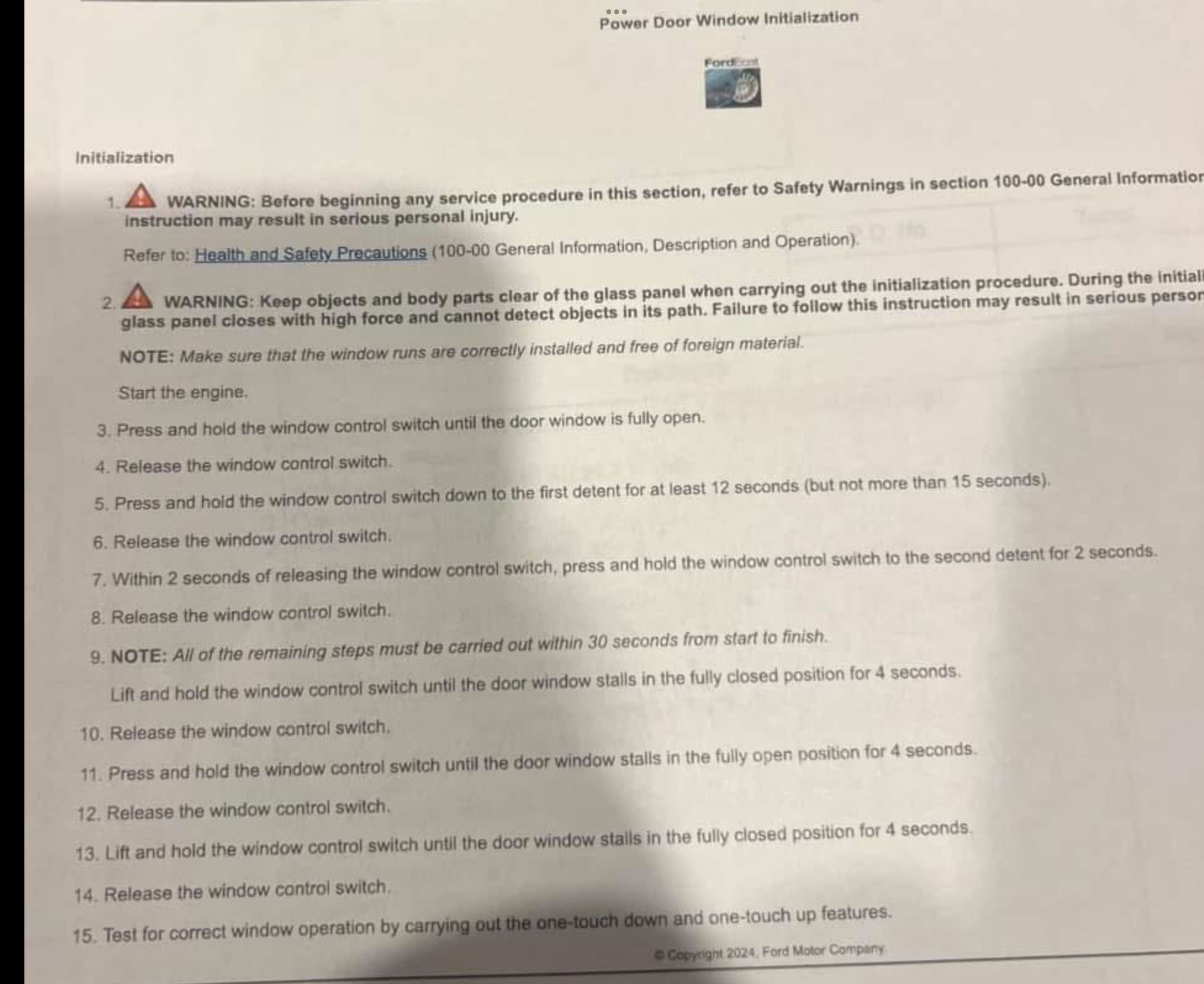
For stubborn 2024 F250 window bounce back cases, the standard 2-second reset often fails. A more rigorous, community-verified method using precise timing and detent control delivers far better results.
Use First Detent for 12-Second Reset
The key difference in this advanced protocol is using the first detent, the initial click when you press the switch, instead of the full auto-down position. This subtle input triggers a deeper relearn mode in the window module.
Step-by-step:
- Turn ignition to “On” (engine off)
- Press and hold the window switch to the first detent (manual down)
- Hold for exactly 12 seconds using a timer
- Release, then immediately press to the second detent (full up/auto)
- Hold for 2 seconds after the window closes
This forces the system to recalibrate its baseline travel resistance.
⚠️ Critical: Do not release the switch early. Interrupting the 12-second hold can corrupt the reset and require a restart.
Complete Full Calibration Cycle
After the 12-second reset, finish with a full calibration to lock in the new settings:
- Roll window all the way down
- Hold switch down for 2 seconds after it stops
- Roll window all the way up
- Hold switch up for 5 seconds after full closure
Now test the auto-up function. If done correctly, the window should rise smoothly and stay closed.
Time required: 3–5 minutes
Success rate: Over 70% for non-mechanical cases
Pro Tip: Repeat the process on all affected windows. Some owners reset all four at once to prevent future drift.
Try the Standard 2-Second Reset
If the advanced method feels too technical, start with Ford’s basic recalibration. It works for mild cases or after a battery disconnect.
Hold Down Then Up for 2 Seconds
This simplified version skips the 12-second trigger but still re-maps the window’s travel range.
Steps:
- Turn ignition to “On”
- Lower window completely
- Hold switch down for 2 seconds after bottoming out
- Raise window fully
- Hold switch up for 2 seconds after reaching the top
Test the auto function immediately. While easier, this method has a lower success rate on persistent issues, especially if the system needs a deeper reset.
When to use it:
– After replacing the battery
– First-time occurrence
– Minor calibration drift
If it fails, move to the advanced 12-second method.
Diagnose Switch and Mechanical Issues
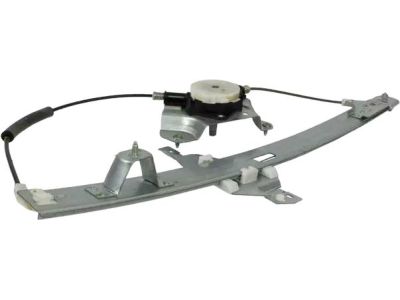
If resets fail, the problem may be physical. The 2024 F250 window bounce back isn’t always software. Mechanical drag or faulty components can trigger false obstruction alerts.
Check for Track Binding or Misalignment
Even slight misalignment increases resistance, fooling the anti-pinch sensor.
What to look for:
– Window glass wobbling during motion
– Rubbing or scraping sounds
– Uneven gap between glass and door frame
To test:
– Roll window halfway down
– Gently wiggle the glass front to back and side to side
– Any movement beyond 1/8 inch suggests loose regulators or misalignment
Fix: Lubricate tracks with silicone spray. Do not use WD-40. Realign if necessary.
Inspect Window Regulator and Motor
A failing regulator or motor creates inconsistent movement, which the system interprets as an obstruction.
Warning signs:
– Window moves slower than usual
– Jerky or uneven ascent or descent
– Motor whines or strains
If present, the issue likely requires part replacement, especially if resets provide only temporary relief.
Pro Tip: Remove the door panel to visually inspect the regulator cables. Fraying or kinking means replacement is needed.
Visit the Dealer for Software Flash
When DIY fixes fail, professional intervention becomes necessary. Many 2024 F250 window bounce back cases require a software update only accessible via Ford’s diagnostic tools.
Request a Window Module Reprogram
Dealers use FDRS (Ford Diagnostic and Repair System) to access the window control module directly. They can:
- Perform a hard reset that bypasses switch inputs
- Reprogram the anti-pinch sensitivity thresholds
- Install confirmed TSBs (Technical Service Bulletins) addressing window logic
One documented TSB specifically targets erratic window behavior in 2023–2024 F-Series trucks.
What to ask for:
“Please check for active TSBs related to window auto-reverse and perform a module reflash.”
Expect Possible Recurrence After Update
Be aware: some owners report the 2024 F250 window bounce back returns within two weeks of a software update. This suggests the fix may be temporary if underlying mechanical issues aren’t resolved.
Warranty note: If your truck is under warranty, insist on documentation of the repair. Recurring issues may qualify for hardware replacement.
Prevent Future Bounce Back Issues
Once fixed, keep the 2024 F250 window bounce back from returning with simple maintenance and smart usage habits.
Lubricate Tracks Every 6 Months
Friction is the enemy of smooth auto-up operation.
Best practice:
– Use silicone-based lubricant
– Spray along rubber channels and metal tracks
– Operate window up and down 3–5 times to distribute
Avoid oil-based lubes. They attract dirt and increase drag over time.
Avoid Holding Auto Button Too Long
Holding the switch after the window stops confuses the logic module. It interprets continued input as a conflict.
Correct usage:
– Press once for auto-up or auto-down
– Release immediately after the window starts moving
– Use manual (half-press) if auto fails
This reduces wear on the switch and prevents logic errors.
Maintain Battery Health
Low voltage during operation or reset can corrupt calibration.
Prevention tips:
– Ensure battery is fully charged before attempting resets
– Replace weak batteries older than 4–5 years
– Avoid window use during engine cranking or accessory mode with low charge
A stable 12.6V+ system voltage ensures reliable module programming.
Compare Model Year Differences
The 2024 F250 window bounce back is notably absent in earlier models, pointing to a design change in the 2023+ lineup.
2023–2024 Models Have Sensitive Switches
Owners report the new switches feel lighter and more reactive. The two-stage detent system was redesigned, making it easier to accidentally engage auto-mode or send conflicting signals.
Key changes:
– Increased anti-pinch sensitivity
– Faster response to resistance changes
– Narrower tolerance for mechanical variance
While safer, this reduces forgiveness for minor binding or aging components.
2017–2022 Models Are More Tolerant
Older F-250s rarely exhibit bounce back. Their window logic allows more travel force before reversing, making them less prone to false triggers even with some friction.
Takeaway: If you upgraded recently, the issue isn’t your imagination. It’s a real shift in Ford’s calibration philosophy.
Follow the Troubleshooting Decision Flow
Not sure where to start? Use this step-by-step decision path to resolve 2024 F250 window bounce back efficiently.
Window Bounces Back on Auto-Up
Perform the Advanced 12-Second Reset using the first detent, holding 12 seconds down and 2 seconds up.
Reset Fails or Issue Returns Quickly
Inspect tracks and lubricate. Clean debris, apply silicone spray, and check alignment.
Lubrication Doesn’t Help
Visit the dealer for a software flash. Request a TSB check and module reprogramming.
Problem Returns After Dealer Visit
Inspect hardware including the regulator, motor, and wiring harness. Check for voltage drops or loose connectors.
Warranty action: If under coverage, demand hardware inspection and replacement if needed.
Frequently Asked Questions About 2024 F250 Window Bounce Back
What causes the 2024 F250 window bounce back issue?
The issue stems from hyper-sensitive anti-pinch programming in 2023–2024 models. The window module misreads minor resistance as an obstruction and reverses direction to prevent injury. Calibration drift after battery disconnects often triggers false positives.
How long do I hold the switch during the advanced reset?
Hold the first detent (manual down) for exactly 12 seconds, then hold the second detent (auto-up) for 2 seconds after the window closes. Use a timer for accuracy. Interrupting the hold can corrupt the reset.
Can I fix the window bounce back without going to a dealer?
Yes, in many cases. The advanced 12-second reset resolves over 70% of non-mechanical issues. If the reset fails repeatedly or the problem returns within days, a dealer software flash may be necessary.
Why does the bounce back come back after a dealer software update?
Software updates address the control logic but don’t fix underlying mechanical friction or switch sensitivity. If tracks are binding or the battery voltage is low, the issue can recur within two weeks. Always lubricate tracks and check battery health before and after a dealer visit.
Is the 2024 F250 window bounce back covered under warranty?
Yes, if your truck is under factory warranty. Document all reset attempts and dealer visits. Recurring issues that resist software fixes may qualify for regulator or motor replacement under coverage.
Which Ford models are affected by this window problem?
The issue primarily affects 2023–2024 Ford F-250 and F-150 models, especially higher trims like the Platinum. Earlier model years (2017–2022) rarely exhibit this behavior due to less sensitive switch programming.
Key Takeaways for Fixing Your 2024 F250 Window Bounce Back
The 2024 F250 window bounce back is a known quirk, not a death sentence. Most owners restore full function at home using the advanced 12-second reset protocol at the first detent. When software and sensitivity collide, a dealer-level software flash may be unavoidable, but it isn’t always permanent.
Stay proactive: reset early, lubricate tracks every six months with silicone spray, and avoid holding the auto-button after the window stops moving. Your windows should work seamlessly, and now you have the tools to make sure they do.
Next step: Try the advanced reset protocol today. If the issue persists within a week, schedule a dealer visit and request a TSB check while documenting everything for warranty purposes.


