
Cold mornings make a warm steering wheel feel essential, but lingering heat can become uncomfortable as your cabin warms up. Many Ford F-350 owners struggle to find the right button or menu option to stop the warmth once winter chill fades.
This guide explains exactly how to turn off heated steering wheel Ford F350 systems across different model years and trims. You will learn to use touchscreen menus, locate physical buttons, and interpret visual cues to disable the feature instantly.
Disable Heated Steering Wheel via Touchscreen Controls

Modern F-350 trims like Platinum and Lariat use digital interfaces to manage climate features. The process involves navigating the SYNC or Ford Digital Experience screen to find the specific toggle.
Access the Climate Control Menu
Start by tapping the Climate icon on your main infotainment home screen. This action opens the full climate settings panel where you manage temperature, fan speed, and seat controls. On 2022 models and newer, this menu is prominently displayed for easy access.
Locate the Steering Wheel Icon
Look for the Steering Wheel symbol within the climate panel. This icon often sits grouped with heated and cooled seat controls at the bottom left of the display. If you do not see it immediately, swipe the screen or expand the lower panel to reveal all available options.
Toggle the Heating Element Off
Tap the steering wheel icon to change its status. If the system is active, the icon typically appears red. A single tap will turn the icon white, indicating the heating element is now off. The change happens instantly without needing further confirmation.
Pro Tip: Watch for small flame or heatwave animations on the screen. These visuals disappear completely when you successfully disable the heater.
Use Physical Buttons on Climate Panels
Base trims or older F-350 models often rely on a dedicated physical button rather than a touchscreen menu. This method requires pressing a hard button located on your dashboard climate control unit.
Find the Dedicated Heater Button
Identify the specific heated steering wheel button on the lower section of your climate control panel. It usually features a steering wheel icon with wavy lines representing heat. This button is distinct from the seat heater controls.
Cycle Through Settings to Disable
Press the button repeatedly to cycle through the available settings. Each press changes the intensity level or toggles the system state. Continue pressing until no indicator lights remain lit on the button face or the adjacent digital display.
Note: Unlike seat heaters that often have multiple levels, the steering wheel typically has simple on and off states. When all lights go out, the system is fully disabled.
Verify System Status Using Visual Cues

Pressing a button does not guarantee the system is off if you miss the visual feedback. Always confirm the status using the specific indicators designed for your model year.
Interpret Icon Colors on Digital Displays
On touchscreen models, the color of the icon tells the whole story. A red icon means heating is active, while a white icon confirms the system is off. If the icon remains red after tapping, press it again to ensure the command registered.
Check for Illuminated Indicator Lights
For physical panels, zero illuminated lights means the feature is off. Even a single glowing segment indicates the system is still drawing power and generating heat.
Warning: Do not rely on touch alone to check status. The leather retains residual warmth after shutdown, so visual indicators are your only reliable confirmation.
Understand Automatic Shutoff Features
You do not always need to manually disable the heated steering wheel because Ford builds in automatic safety features. Knowing these behaviors helps you understand why the system might turn itself off.
Ignition-Based Power Down
The heated steering wheel shuts off automatically when you turn off the engine. This standard feature prevents battery drain while the vehicle is parked. You must manually reactivate it every time you start the truck if you want heat again.
Thermal Sensor Regulation
A built-in thermal sensor monitors the surface temperature of your steering wheel. If the wheel reaches a target warmth, the system may reduce power or cycle off temporarily even if the icon appears active.
Don’t panic if: The wheel feels warm but the icon is white, or vice versa. This is normal behavior caused by residual heat or sensor modulation.
Troubleshoot Unresponsive Heating Controls
Sometimes the system seems stuck or unresponsive to your inputs. Run through this quick checklist before assuming a mechanical fault exists in your F-350.
Confirm Correct Menu Location
On some models, the steering wheel control is hidden within seat heater settings. Double-check the bottom-left quadrant of the touchscreen and tap the heated seat icon to look for a secondary option labeled “Steering Wheel.”
Reboot the Infotainment System
A frozen screen can prevent input recognition. Restart the system by pressing and holding the radio power button for 10 seconds. Wait for the screen to go black and reboot, then reattempt disabling the feature.
Test After Engine Restart
If the button or screen remains unresponsive, turn the truck off and back on. This resets electronic modules and often resolves temporary glitches affecting climate controls.
When to see a dealer: If the icon remains red, lights stay on, and the wheel heats continuously despite all attempts, there may be a software or relay issue requiring professional diagnostics.
Benefits of Disabling the Heater When Not Needed
Turning off the heated steering wheel when the cabin is warm offers practical benefits for your vehicle and driving comfort. It is not just about personal preference.
Conserve Battery Power
The heating element draws power from the 12V battery. While minimal during engine operation, unnecessary load adds up on trucks with winches, campers, or aftermarket electronics. Turning it off reduces parasitic draw.
Fact: The heated steering wheel consumes approximately 3 to 5 amps. Disabling it when not needed helps preserve electrical capacity.
Prevent Discomfort from Overheating
In spring or fall, active heating can make the wheel uncomfortably warm. This leads to sweaty palms and reduced grip quality. Disabling it maintains optimal handling and driver comfort during mild weather.
Extend Component Lifespan
Like any electrical system, less runtime means a longer lifespan. Turning off the heater when unnecessary reduces wear on wiring, connectors, and the heating coil itself over the life of your truck.
Model Year Differences in Control Methods

Not all F-350s work the same way. Knowing your specific model year helps you avoid confusion when searching for controls.
2019 to 2021 Models
- Use physical buttons or basic touchscreen menus.
- Steering wheel control is often accessed via Menu > Climate Settings.
- Icons may not change color, so rely on light presence or absence.
2022 and Newer Models
- Feature full touchscreen integration in the Climate menu.
- Use color-coded icons where red means on and white means off.
- Controls are located with seat controls at the screen bottom.
Expert Note: Trim level matters. The feature is standard on Platinum and Lariat, optional on King Ranch, and rarely available on XL or XLT unless part of a premium package.
Quick Reference Guide to Disable Heat
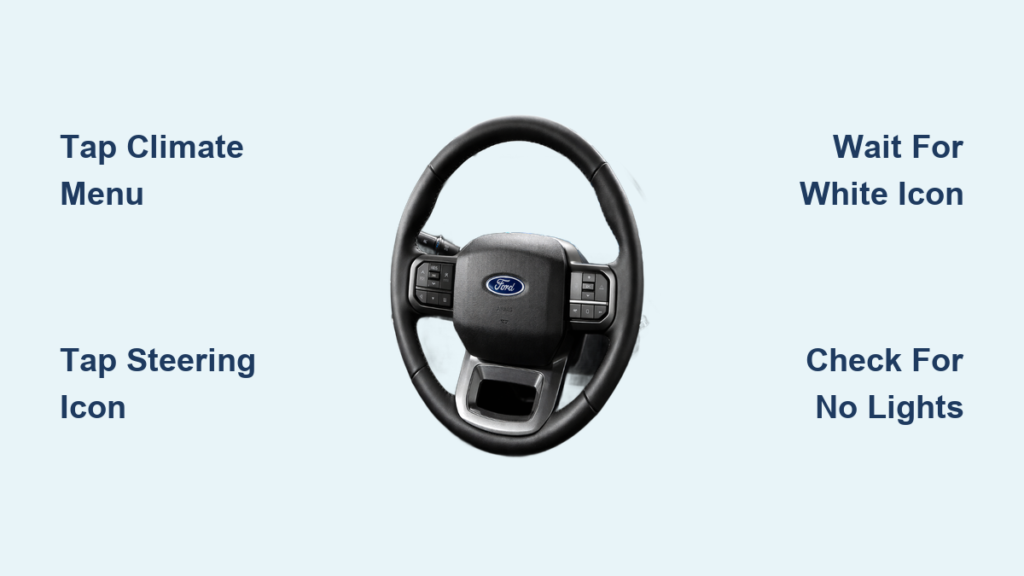
Follow this fast guide if you need to turn off the heat immediately while on the go.
- Find the Control
- Touchscreen: Tap Climate > Steering Wheel icon
- Physical Panel: Press heated wheel button
- Toggle to Off
- Screen: Tap until icon turns white
- Button: Press until lights go out
- Verify Status
- Confirm no red color or illuminated lights remain
✅ Done. Your system is now off.
Frequently Asked Questions About Turning Off Ford F-350 Heated Steering Wheel
Does the heated steering wheel turn off automatically?
Yes, the system turns off automatically when you shut off the ignition to save battery power. You must manually reactivate it each time you start the vehicle if heat is desired.
Why does my steering wheel icon stay red after I tap it?
If the icon remains red, the command may not have registered, or a thermal sensor is keeping it active. Try tapping it again or rebooting the infotainment system by holding the power button.
Can I turn off the heated steering wheel using voice commands?
Some Ford Digital Experience systems support voice commands for climate control. Try saying “Turn off heated steering wheel” to see if your specific model year supports this feature.
Why does the wheel feel warm even when the icon is white?
Leather retains heat after the element shuts off. This residual warmth is normal and does not mean the system is still running if the visual indicator shows white or off.
Where is the heated steering wheel button on base model F-350s?
On base trims without large touchscreens, look for a dedicated button with a steering wheel icon on the lower climate control panel. Press it until all indicator lights disappear.
Key Takeaways for Turning Off Heated Steering Wheel Ford F350
Knowing how to turn off heated steering wheel Ford F350 systems ensures you stay comfortable and efficient regardless of the weather. Remember that touchscreen models require tapping the climate menu to change the icon from red to white, while physical buttons need repeated presses until lights vanish.
Always verify the status visually rather than by touch, as residual heat can be misleading. Use these steps to manage your cabin environment effectively and preserve your truck’s battery life today.


