If your F150 steering wheel buttons are not working, you are dealing with a frustrating issue that affects thousands of Ford F-150 owners across model years 2011 to 2021. These buttons control critical functions like audio volume, cruise control, phone integration, and voice activation, so when they fail, it impacts both safety and convenience. The good news is that most cases have clear causes and affordable fixes. Whether your volume button changes the radio source unexpectedly, your cruise control won’t engage, or none of the buttons respond at all, this guide will help you diagnose, troubleshoot, and fix the problem quickly.
You will learn how to identify if the issue stems from a faulty clockspring, a failed switch module, or a Sync 4 software glitch, and exactly what steps to take whether you are a DIYer or need to push back at the dealership. Let us get your truck working right.
Decode the Symptom Pattern
Understanding exactly how your buttons are failing is the key to identifying the root cause. Different symptom patterns point to different components, and matching the pattern to the problem will save you time and money on unnecessary parts.
Mixed Functions? It Is Likely the Clockspring
When pressing volume up changes your audio source or skip track activates cruise control, you are experiencing signal crossover, which is a hallmark of clockspring failure. This spiral cable behind the steering wheel transmits signals from rotating controls to the vehicle is electrical system. As it wears, internal ribbon wires break or short, sending scrambled commands to the truck is computer.
Classic signs of clockspring failure include:
• Volume button skips tracks, voice command triggers cruise, OK button does nothing
• Buttons work only when the wheel is straight
• Multiple systems down at once, including horn, cruise, and audio
• Airbag light is on, which often runs through the same clockspring
User insight: “If the functions are mixed up, it is 100% clock spring.” — effwunfiddy
Intermittent but Correct? Check the Button Module
If buttons respond randomly but perform the right action, such as volume up working only sometimes, the steering wheel switch assembly may be failing. This is especially likely if only one side fails, if there is no function crossover, or if buttons feel stiff or unresponsive. These modules wear out over time due to moisture, repeated use, or internal corrosion. The fix often involves replacing the left, right, or center pad without removing the steering wheel.
Left Side Dead After Voice Command? Sync 4 Bug
Owners of 2021+ F-150 Lariat and higher trims report a unique issue where using the voice command button causes the left-side controls to stop working afterward. This points to a software conflict in Sync 4 rather than hardware failure. The pattern shows only left-side controls affected while right-side audio buttons still work. A reboot or software reflash typically resolves this temporarily.
Test for Clockspring Failure
Before spending money on parts, perform these two diagnostic tests to confirm whether the clockspring is the culprit.
Rotate Wheel While Holding a Button
This simple test confirms clockspring issues in minutes. Turn the truck off, press and hold the volume up or cruise set button, then slowly turn the steering wheel from full left to full right. If the function works in one position but not others, the clockspring is failing. This happens because the internal ribbon cables only make contact when aligned, which proves physical wear.
Pro tip: Perform this test before buying any parts. It is the most reliable field test for clockspring failure.
Perform a Battery Disconnect Reset
Many intermittent issues clear temporarily with a full electrical reset. Disconnect the negative battery terminal, wait 10 to 60 minutes for the airbag capacitor to drain, then reconnect and start the truck. Test all buttons afterward.
What to expect:
• About 30% of cases see temporary return of function
• This clears software glitches, resets module memory, and can reseat corrupted CAN bus signals
Note: If function returns but fails again within days, it is likely hardware-related.
Replace the Clockspring (Most Common Fix)
The clockspring is the most common cause of steering wheel button failures, especially when functions are mixed or position-dependent.
Why It Fails and When to Replace
The clockspring is a wear item designed to last 100,000+ miles, but premature failure is common in 2011–2017 models and still reported in 2021+ trucks. It fails due to repeated steering motion, vibration from rough roads, poor-quality aftermarket units, or moisture intrusion. Replace the clockspring if functions are mixed, buttons work only in certain positions, the airbag light is on, or previous switch module replacement did not help.
Dealer mistake: Some dealerships replace the entire steering wheel or switch pack, missing the real culprit.
Tools and Safety Steps
You will need:
• 24mm socket for the steering wheel nut
• T25 or T30 Torx driver, depending on year
• Plastic pry tool
• Battery disconnect cable
• Optional multimeter for continuity testing
Critical safety rules:
• Always disconnect the battery first
• Wait at least 10 minutes before touching the airbag
• Place the airbag face-down on the seat after removal
• Never probe connectors while powered
• Avoid static discharge near the module
Step-by-Step Replacement
- Disconnect negative battery terminal and wait 10+ minutes.
- Remove the airbag module by locating release tabs behind it, which often require a long Allen wrench or Torx tool. Gently pry and unplug.
- Remove the steering wheel nut using a 24mm socket.
- Pull off the steering wheel, which may require a puller if stuck.
- Unplug clockspring connectors.
- Remove mounting screws and take out the old unit.
- Install the new clockspring, ensuring it is centered and clicks into place.
- Reassemble in reverse order.
No relearn needed: Clocksprings do not require programming after installation.
Time required: 30 to 60 minutes for experienced DIYers, up to 2 hours the first time.
OEM vs Aftermarket: Which to Buy?
| Option | Cost | Pros | Cons |
|---|---|---|---|
| Aftermarket | $50–$100 | Affordable, widely available | Mixed durability; some fail in under 1 year |
| OEM (Ford) | $90–$150 | Reliable, longer lifespan | Higher cost |
Recommendation: Spend a little more on OEM or top-rated aftermarket units. Check reviews on RockAuto or Amazon before buying.
Replace the Button Assembly (If Clockspring Is Good)

If the clockspring tests good or was recently replaced and buttons remain non-responsive, the switch module is likely the issue.
When to Try This Fix
Consider button assembly replacement if buttons are non-responsive but not mixed up, there is no position dependency, and the clockspring tested good or was recently replaced. These modules are modular and replaceable. The left pad controls cruise, voice, and OK. The right pad controls volume and track skip. The center button can be swapped separately in some models.
How to Replace Without Removing the Wheel
- Disconnect the battery and wait 10 minutes.
- Remove the airbag using the same procedure as clockspring replacement.
- Locate the 4 small hex screws holding the button pad.
- Unscrew and gently pry out the module.
- Unplug the harness and replace with the new unit.
- Reassemble in reverse order.
User result: “On my 2012 it was just the button assembly. Did not have to remove steering wheel.” — srs1990
Time: Under 20 minutes once you have removed the airbag.
Cost: $40 to $100 per module for aftermarket units.
Diagnose Software and Sync 4 Glitches
Newer F-150s with Sync 4 and adaptive cruise control show software-related patterns that can mimic hardware failure.
2021+ Models: Is It a Sync 4 Bug?
Newer trucks with Sync 4 exhibit a specific pattern where left-side buttons fail after using the voice command button. There is no physical damage or wear, function returns after reboot, and no diagnostic trouble codes are present. The hypothesis is that voice activation mode may disable other inputs to prevent conflicts.
How to test and fix:
- Perform an infotainment reset by holding Power plus Eject (or Menu plus Back) for 10 seconds. Wait for the screen to reboot.
- Try a battery disconnect for 10+ minutes.
- Visit the dealer for software reflash via Ford IDS, TSB check, or warranty claim if under 3 years or 36,000 miles.
Note: No official TSB exists yet, but multiple users report success with dealer software updates.
Check for CAN Bus and Grounding Issues
If both hardware replacements fail, look deeper at electrical issues. CAN bus errors can corrupt signal data, and poor grounding causes intermittent faults.
Diagnostic steps:
- Use FORScan or similar OBD2 tool to scan the airbag module, BCM, and infotainment system.
- Look for open circuit codes, high resistance, or module communication loss.
- Inspect ground points at the steering column, firewall, and battery negative terminal.
- Check the wiring harness for chafing or pinch points.
Warning: Some clockspring failures do not generate DTCs, so no code does not mean no problem.
Model-Specific Fixes by Year
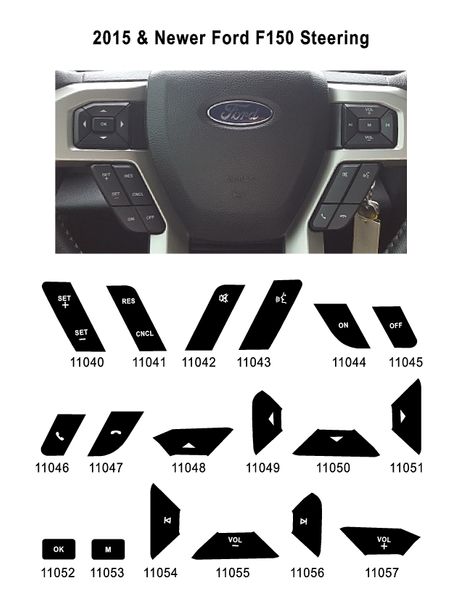
2011–2014: Clockspring or Switch Pack
The most common issue is clockspring failure with mixed functions. The fix is replacing the clockspring or button module. These years are DIY-friendly with simple disassembly and common T25 Torx fasteners.
2015–2017: Clockspring Dominates
XLT and Lariat trims are frequently affected. Cruise and OK button failures are common. Clockspring replacement is the confirmed fix, with multiple users confirming success after replacement.
2021 Lariat: Software Meets Hardware
Symptoms show left-side controls dying after voice use. Possible causes include Sync 4 software bug, clockspring issues, or ADAS integration quirks. The action plan is to try a battery reset first, request a software update at the dealer, and if persistent, replace the clockspring.
Reality check: Despite new technology, the same hardware vulnerabilities remain.
Avoid These Common Mistakes
Replacing Parts Without Testing
Do not swap the button module or clockspring blindly. Use the steering wheel rotation test first. If function returns in a specific position, skip directly to clockspring replacement.
Ignoring the Airbag Safety Protocol
Never remove the airbag without disconnecting the battery, waiting 10+ minutes, and handling the module face-down. One spark or static discharge could cause catastrophic deployment.
Assuming a Fuse Is Blown
Fuses rarely cause this issue. Check fuse 27 for horn and steering wheel functions, but no user has confirmed a blown fuse as the root cause. Check fuses only if other electrical systems are down.
Overlooking Software in New Trucks
On 2021+ models, do not assume it is hardware. Push for a software reflash before paying for parts. Use your warranty coverage.
Cost Comparison: DIY vs Dealer
| Option | Parts Cost | Labor Cost | Total | Risk |
|---|---|---|---|---|
| DIY Clockspring | $50–$150 | $0 | $50–$150 | Low (if safety followed) |
| DIY Button Module | $40–$100 | $0 | $40–$100 | Very low |
| Dealer Diagnosis + Clockspring | $100–$150 | $150–$300 | $300–$600+ | High (misdiagnosis common) |
| Dealer Software Fix (Warranty) | $0 | $0 | $0 | Best option for new trucks |
Savings: DIY can save $400 or more with the same result.
Final Fix Checklist
Use this step-by-step workflow to systematically diagnose and fix your steering wheel buttons.
Step 1: Soft Reset
Disconnect the battery for 10+ minutes, reconnect, and test all buttons.
Step 2: Position Test
Hold a button while turning the wheel. If function returns in one spot, the clockspring is the culprit.
Step 3: Scan for Codes
Use FORScan or similar tool to check airbag, BCM, and infotainment modules for trouble codes.
Step 4: Replace Clockspring
If the position test confirms it, replace the clockspring using OEM or high-rated aftermarket parts.
Step 5: Swap Button Module
If the clockspring is good, replace only the faulty side button assembly.
Step 6: Visit Dealer (2021+)
Request a software reflash, file a warranty claim, and ask for a loaner if needed.
Prevent Future Failures
Keep your steering wheel buttons working reliably with these maintenance tips.
• Avoid excessive force on buttons during use
• Use OEM-quality replacements because cheap clocksprings fail faster
• Inspect connections if symptoms return
• Keep software updated, especially on Sync 4 trucks
Key Takeaways for Fixing Your F150 Steering Wheel Buttons
When your F150 steering wheel buttons are not working, start with the clockspring because it is the most likely culprit, especially if functions are mixed or position-dependent. For simple unresponsiveness, try the button assembly first. On 2021+ models, Sync 4 software glitches are emerging as a real concern, so do not overlook a dealer reflash before replacing hardware.
With the right tools and safety steps, both clockspring and switch module replacements are affordable DIY jobs that take under an hour. You can save hundreds of dollars by skipping the dealership and fixing it yourself. Just remember to disconnect the battery, wait the required time, and handle the airbag with care.
Final tip: If you are still unsure, perform the steering wheel rotation test. It is the fastest way to determine whether you need a new clockspring.
Frequently Asked Questions About F150 Steering Wheel Buttons Not Working
How do I know if my F150 clockspring is bad?
If your buttons work only in certain steering positions, if functions are mixed up such as volume changing the radio source, or if multiple systems like cruise, horn, and audio fail together, your clockspring is likely bad. An airbag light that comes on simultaneously is another strong indicator.
Can I drive my F150 with broken steering wheel buttons?
You can drive, but functionality will be limited. You will lose cruise control, audio controls, and possibly the horn. For safety, especially on highway trips, address the issue promptly. The problem will not resolve itself and typically worsens over time.
How much does it cost to fix F150 steering wheel buttons?
DIY repair costs $50 to $150 for parts. Dealership repairs can run $300 to $600 or more, especially if they misdiagnose the issue. The clockspring is the most common fix and costs the least to repair yourself.
Does Ford cover steering wheel button repairs under warranty?
Newer F-150s under 3 years or 36,000 miles qualify for warranty coverage. Software-related issues in 2021+ models with Sync 4 are typically covered. Contact your dealer to file a claim before paying for out-of-pocket repairs.
Can a battery reset fix steering wheel button issues?
A battery disconnect reset works for about 30% of cases, but the effect is often temporary. This method clears software glitches and resets module memory. If the problem returns within days, the issue is hardware-related, not software.
Do I need to reprogram anything after replacing the clockspring?
No, clockspring replacement does not require programming or relearn procedures. Simply install the new unit, reassemble everything, and test the buttons. The truck is computer recognizes the new component automatically.