

The Ford F-150’s Auto Start/Stop (ASS) system is designed to improve fuel economy by shutting off the engine at stops and restarting it when you release the brake. But if your F-150 auto stop not working, you’re not alone. Thousands of owners report the same issue: the engine keeps idling despite a complete stop, the gray “A” icon appears but no shutdown happens, or the system works only occasionally without triggering warning lights or error codes.
This isn’t always a broken system. Sometimes it’s a weak battery, software glitch, or normal climate-related override. But when auto stop fails consistently even under ideal conditions, it’s time to diagnose the real cause. In this guide, you’ll learn how to identify why your F-150’s auto stop isn’t working, test critical components, and apply proven fixes whether you’re facing a simple reset or a deeper electrical issue. You’ll also discover how to permanently disable the feature if you’ve had enough.
Check Normal System Inhibitors First
Before assuming failure, confirm your truck isn’t blocking auto stop for a valid reason. Ford’s system disables itself under specific conditions, many of which owners mistake for malfunctions.
Climate and Temperature Blocks
Cold weather is a top reason for auto stop disablement. Below 32°F (0°C), the system stays off to protect the engine and ensure reliable restarts. Similarly, if the cabin is extremely hot or cold, the climate control demands continuous engine operation. Defrost mode, front or rear, also prevents shutdown to maintain airflow for window clearing. Air conditioning under high load can override the system too.
Engine and Driving Conditions
The engine must reach normal operating temperature, approximately 195°F, before auto stop activates. During warm-up, the system remains inactive. If you’re making short trips, the engine may never get hot enough.
Other valid blocks include:
- Vehicle on a steep incline
- 4WD mode engaged
- Trailer connected
- Steering wheel turned fully
- Doors open
- Transmission not in Drive
Pro Tip: Look at your instrument cluster. If a message like “Engine On Due to Charging,” “Low Temperature,” or “HVAC Demand” appears in the Trip/Fuel menu, the system is working as intended.
Only proceed if these conditions don’t apply and the engine still refuses to shut down.
Test Your Battery Health Immediately

Battery condition is the number one cause of F-150 auto stop failure, even if the engine starts fine. The ASS system relies on a strong, stable 12V AGM battery. If voltage drops too low, Ford’s software disables the feature to prevent a no-start situation.
Perform a Voltage Check
Use a multimeter to test resting voltage. Disconnect the battery for 10 minutes to stabilize, then reconnect and measure across terminals with ignition off.
Results:
- 12.6V or higher = Fully charged
- 12.4–12.6V = Acceptable
- Below 12.4V = Undercharged or failing
If voltage is below 12.4V, recharge with a smart charger. Many users report restored function after a full charge.
Look for Physical Signs
Check for:
- Swelling or bulging case
- Corrosion on terminals
- Leaking fluid (rare on AGM)
A swollen battery at just 12,000 miles has been reported, proof that premature failure happens.
Replace and Reset the Battery
If voltage is low or the battery is over 2 to 3 years old, replace it with an OEM-spec AGM battery. After replacement, reset the Battery Monitoring System (BMS):
- Use a professional scan tool with BMS reset function (best method).
- Alternatively, disconnect the negative terminal for 15 minutes (less reliable).
Without a reset, the truck may not recognize the new battery, and auto stop will stay disabled.
User Confirmed: One owner replaced a weak battery and ASS returned. Another saw function return for two weeks, then fail again after the truck sat unused.
Battery health isn’t optional. Even a slightly degraded battery can silently disable the system.
Diagnose Software and Calibration Glitches
Software bugs and system learning modes can mimic hardware failure. After a firmware update or battery disconnect, the ASS system may enter calibration mode and delay shutdowns.
Check for Recent Updates
The Sync 1049 update has been linked to auto stop issues. Some users report the system stays active but never shuts down. If your truck recently received an update, the problem may be software-related.
After a PCM or ECU flash, the system often requires:
- 10 to 20 minutes of stable driving
- Engine to reach normal operating temperature
- Multiple stop-start cycles to relearn behavior
Perform a System Reset
Try these steps:
- Turn off the truck.
- Open the hood and disconnect the negative battery terminal.
- Wait 10 to 15 minutes.
- Reconnect and start the engine.
- Drive for 30 or more minutes, including several stops.
This clears temporary faults and forces a recalibration.
Reprogram PCM or BCM
At the dealership, technicians can reflash the Powertrain Control Module (PCM) or Body Control Module (BCM). This corrects logic errors or faulty thresholds. If software is corrupt, reflashing may be the only fix.
Warning: One user had the battery replaced twice and the “brain” replaced, yet auto stop still failed. Software fixes don’t always work alone.
Inspect Wiring and Under-Dash Connections
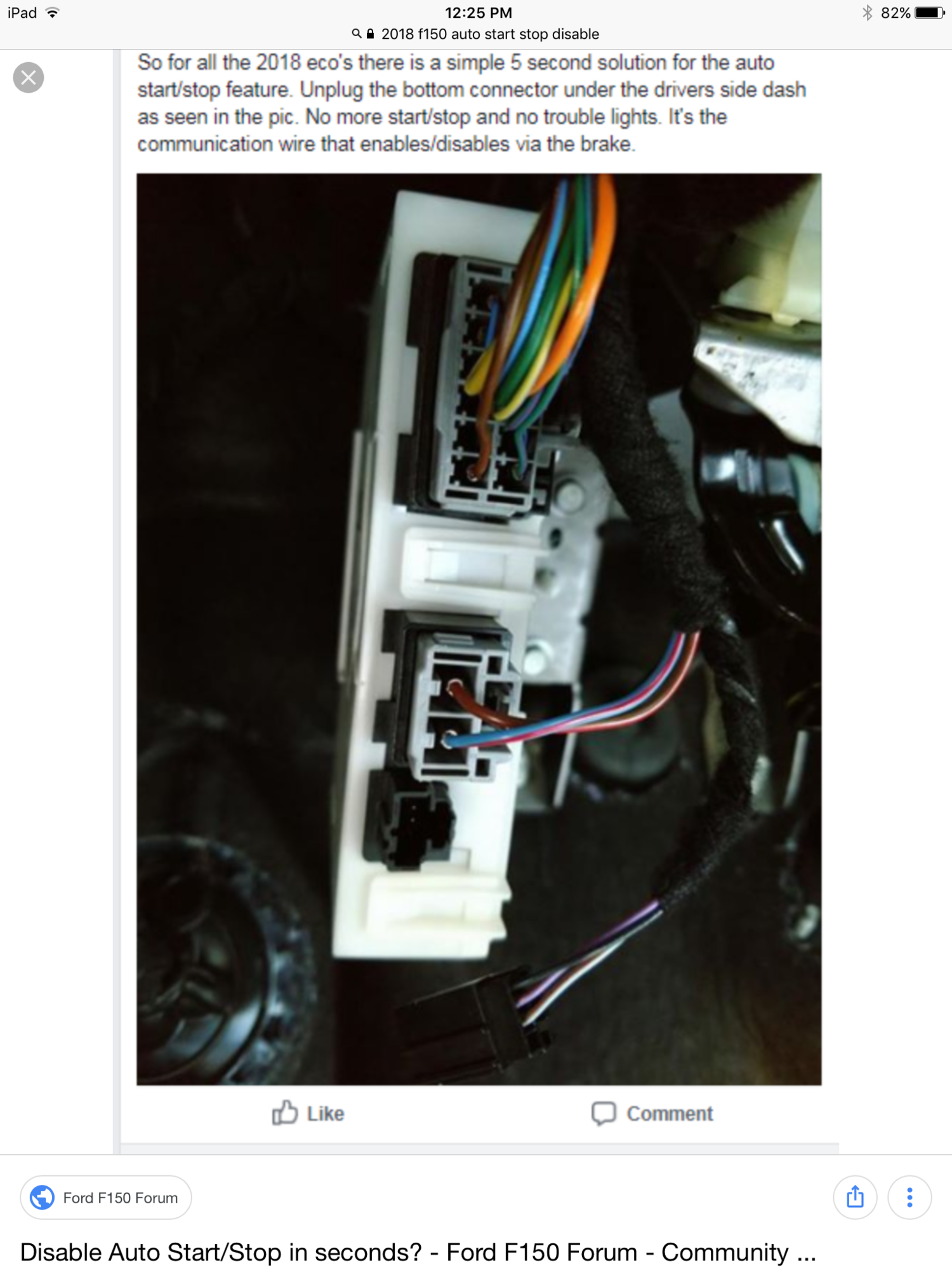
Electrical faults, especially disconnected wires, can disable auto stop without triggering codes.
Locate the Trailer Brake Wire Clip
A small wire harness under the dash, left of the brake pedal, connects to the trailer brake system. If this is unplugged, auto stop fails.
- Why it matters: Some owners unplug it to disable ASS permanently.
- Check it: Look for a loose connector near the brake pedal arm.
- Fix it: Reconnect and secure.
This single wire has caused confirmed failures. If you’ve had recent accessory work like a dash cam, it may have been disturbed.
Look for Rodent or Physical Damage
One owner reported rodent damage to the wiring harness, causing no auto stop, blank gear indicator, and hyphenated odometer. Inspect all under-dash and engine bay wiring for chew marks, fraying, or loose grounds.
Test Critical Sensors
Two sensors directly control restart behavior.
Brake Pedal Position (BPP) Sensor
- Must signal when you release the brake.
- A faulty sensor prevents restarts with no green “A” and no crank.
- Test with a scan tool or multimeter for proper voltage change.
Hood Latch Sensor
- System requires confirmation the hood is closed.
- Located at the front latch mechanism.
- A false “hood open” signal disables auto stop.
- Test for continuity or inspect for misalignment.
Neither sensor always throws a code, so physical testing is key.
Rule Out Aftermarket Modifications
Accessories can interfere with the ASS system’s electrical balance.
Common Culprits
- Grill LEDs tapped into marker lights
- Dash cams drawing constant power
- Poorly grounded inverters or amplifiers
Even if installed months ago, these can contribute to chronic low battery or voltage fluctuations that trigger auto stop disable logic.
Test by Elimination
- Disconnect recent accessories.
- Recharge the battery.
- Take a 50-mile highway drive.
- Test auto stop at next stop.
If it works, one of your mods is likely the issue.
Note: Axxess Start-Stop Delete modules or similar devices permanently disable the system. If installed, they’re the reason it’s not working.
Adjust Driving Habits and Usage Patterns
Your driving routine may be sabotaging the system.
Avoid Short Trip Syndrome
Frequent short drives prevent the alternator from fully recharging the battery. Over time, this leads to chronic undercharging, enough to disable auto stop. If you drive less than 10 miles at a time, the battery never recovers. The system sees low SOC and blocks shutdowns.
Fix It With a Long Drive
Take your F-150 on a 50 or more mile highway trip. This fully charges the battery, resets system modules, and clears soft faults. Two owners reported auto stop returning after long drives.
Prevent Dormancy Issues
Leaving the truck unused for two weeks or more can drain the battery and disable ASS. One user experienced this after a short storage period.
Solution:
- Use a battery maintainer
- Start and drive weekly
- Or take a long drive after storage
Visit the Dealer With a Plan
Dealerships often dismiss auto stop complaints, especially without codes.
What to Demand
- Battery load test (not just voltage check)
- BMS reset after any replacement
- PCM/BCM reflash if update-related
- OBD2 scan for hidden inhibit codes
Bring your own voltage readings and symptom log.
Escalate When Denied
One owner had a swollen battery at 12,000 miles. The dealer refused replacement, and Ford corporate initially backed them. Only after escalation did they agree to test further.
If denied:
- Ask for a case number from Ford Customer Service
- Request a field engineer visit
- Cite repeated failures
Persistence pays.
Permanently Disable Auto Stop If You’re Done
Many owners give up and disable the system for good. It costs 3 to 5 mpg in city driving but eliminates frustration.
Use FORScan Software
Free and effective:
- Buy a $20 OBD2 adapter.
- Install FORScan on laptop or tablet.
- Connect and access BCM or PCM.
- Toggle the “Auto Start/Stop Disable” parameter.
No hardware changes. No fault lights.
Install an ASS Eliminator
Devices like the Auto Start/Stop Eliminator don’t disable the system. They remember your off setting. Normally, the system defaults to “on” at every start. This keeps it off.
- Plug and play
- Reversible
- No coding needed
Hardwire a Disable
For permanent deletion:
- Axxess Start-Stop Delete Module: Installs in-line with BPP sensor. $60, 30-minute install.
- Unplug trailer brake wire: Reversible, free, no tools.
- Disconnect negative terminal wire (2016 EcoBoost): A known bypass.
Note: Disabling ASS does not harm the truck. No performance loss. No check engine light.
Frequently Asked Questions About F-150 Auto Stop
Why does my F-150 auto stop only work sometimes?
Inconsistent auto stop operation usually stems from battery health or software calibration issues. The system requires a fully charged AGM battery and specific conditions like engine being at operating temperature. If either is off, the system stays inactive. Long drives and battery charging often restore consistent function.
Can a weak battery cause auto stop to not work even if the engine starts fine?
Yes. The ASS system monitors battery voltage and state of charge separately from starting ability. A battery that starts the engine can still be too weak to support repeated engine cycling. Ford disables the feature to ensure reliable restarts, so you may need a new battery even if cranking seems normal.
Does cold weather affect F-150 auto stop?
Yes. Below 32°F (0°C), the system disables to protect the engine and ensure reliable restarts. This is normal behavior, not a malfunction. The system will reactivate once temperatures rise.
How do I know if my auto stop is disabled due to a fault versus normal conditions?
Check your instrument cluster. Go to Trip/Fuel menu and look for Auto Start/Stop status. Messages like “Engine On Due to Charging,” “Low Temperature,” or “HVAC Demand” indicate normal inhibitions. If no message appears and conditions are ideal, a fault likely exists.
Will disabling auto stop void my F-150 warranty?
No. Disabling the auto start/stop feature does not void your warranty. The system is optional and can be disabled without affecting other warranty coverage. However, any damage caused by improper installation of disable devices would not be covered.
Can I permanently disable the auto stop feature myself?
Yes. You can use FORScan software with an OBD2 adapter, install an ASS Eliminator device, or unplug the trailer brake wire under the dash. All methods are reversible and won’t trigger check engine lights or harm your truck.
Key Takeaways for Fixing Your F-150 Auto Stop
The F-150’s auto stop system is plagued by inconsistency, not just component failure. Battery health, software logic, and environmental factors all play a role. Start with a voltage test, rule out normal inhibits, then move to wiring and software. If fixes fail, disabling the system is a valid, widely used solution.
Battery health remains the dominant cause of F-150 auto stop failure. Even marginal degradation can disable the feature, so test voltage first and replace with an OEM-spec AGM battery if needed. Always reset the Battery Monitoring System after replacement for best results.
If diagnostics and repairs don’t resolve the issue, permanent disable methods like FORScan software or aftermarket eliminators offer reliable relief. With the right approach, you can either restore function or finally silence the annoyance for good.


