

If your Ford F350 struggles in mud or snow, you likely have not properly engaged the 4 wheel drive system. Many drivers press the dashboard button but forget to lock manual hubs, leaving them stuck with spinning rear wheels. True traction requires a specific sequence that varies by your truck’s model year and engine type.
This guide details exactly how to engage 4 wheel drive on a Ford F350 using both electronic and manual systems. You will learn the critical difference between 4H and 4L, how to lock front hubs correctly, and the exact steps to avoid costly drivetrain damage.
Identify Your Ford F350 4WD System Type

Your engagement procedure depends entirely on whether your truck uses electronic actuators or mechanical manual hubs. Newer gas models typically feature push-button controls with automatic locking hubs. Older diesel models, particularly the 7.3L Powerstroke, often require you to physically turn knobs on the front wheels to connect the axles.
How to Spot Electronic Push-Button Controls
Look for a panel on your dashboard with buttons labeled 2H, 4H, and 4L. If your truck has these buttons, it likely uses an electronic shift-on-the-fly system. These models automatically lock the front hubs when you press the button, requiring no exit from the cab.
Recognizing Manual Locking Hub Configurations
Inspect the center of your front wheel hubs for a knurled knob with “LOCK” and “FREE” markings. If it is there, your truck has manual hubs. You must turn these knobs by hand before the transfer case can send power to the front wheels effectively.
Lock Manual Hubs Before Shifting Transfer Case
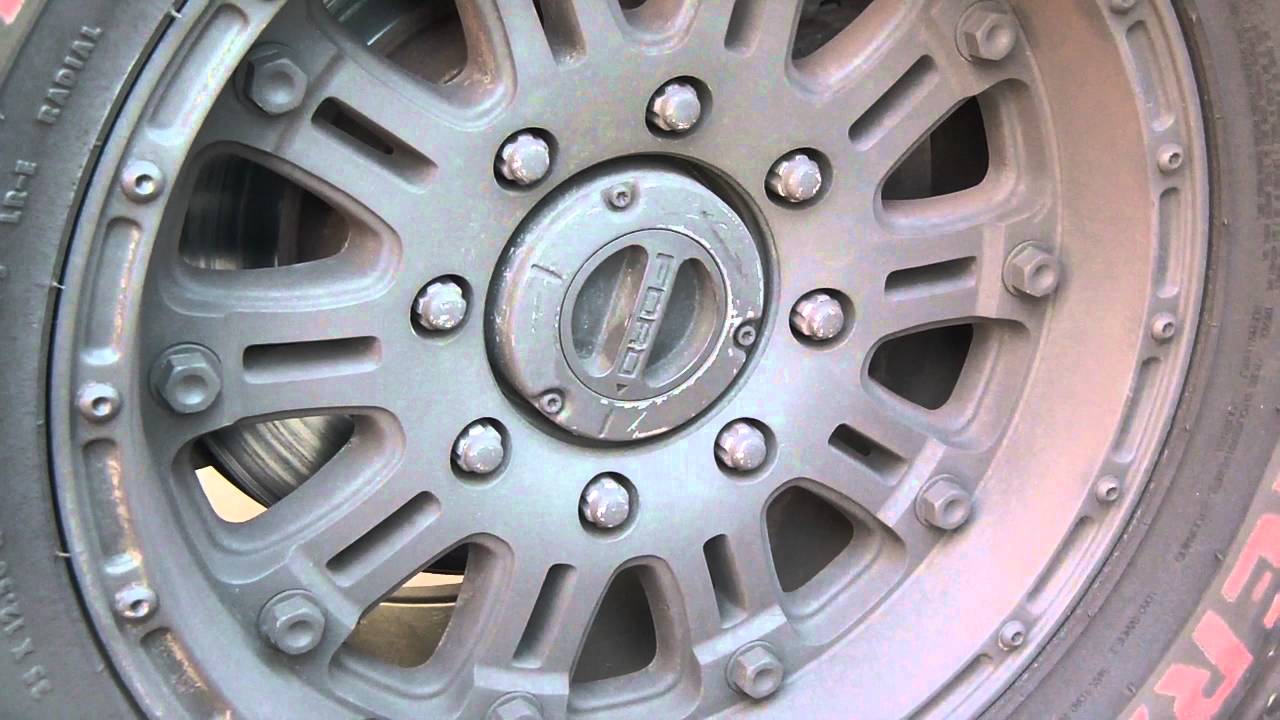
Skipping this step is the most common reason 4 wheel drive fails to engage on older Ford F350 trucks. Even if your dashboard says 4H is active, the front wheels will not pull unless these hubs are mechanically locked to the axle shafts.
Step-by-Step Manual Hub Engagement
- Bring your truck to a complete stop on a stable surface.
- Exit the vehicle and locate the hub controls on both front wheels.
- Turn each hub knob clockwise until you hear and feel a solid click.
- Verify that both knobs are aligned with the “LOCK” indicator.
Pro Tip: Always lock both hubs before moving the transfer case lever. Failing to do so creates a false sense of security while leaving you with only rear-wheel traction.
Understanding the Three-Wheel Drive Trap
Many owners believe the dashboard light guarantees four-wheel traction. On manual hub models, that light only confirms the transfer case is engaged. If hubs remain free, the front driveshaft spins but the wheels do not turn. This condition leaves you effectively in two-wheel drive or worse, depending on rear differential behavior.
Engage the Transfer Case Correctly
Once your hubs are secure, you must shift the transfer case to distribute power to the front axle. The method changes based on whether you need high range for slippery roads or low range for extreme torque.
Using 4H for Snow and Mud
Four-Wheel High provides a 1:1 gear ratio ideal for maintaining momentum on loose surfaces.
* Electronic Systems: Press the 4H button while driving up to 55 mph on slippery surfaces. Wait for the “Four-Wheel in Progress” message to vanish.
* Manual Lever Systems: Slow your truck to under 3 mph. Shift the transmission to Neutral. Move the transfer case lever firmly into 4H. Return the transmission to Drive.
Warning: Never force the lever if the transmission is in Drive. This causes severe gear grinding and potential transfer case failure.
Using 4L for Extreme Off-Road Torque
Four-Wheel Low multiplies engine torque significantly for climbing steep grades or crawling over rocks.
1. Bring the vehicle to a complete stop.
2. Shift the automatic transmission into Neutral.
3. Press the 4L button or pull the lever into the 4L position.
4. Wait approximately 10 seconds for the gears to mesh fully.
5. Shift back to Drive and proceed slowly.
Critical Limit: Never exceed 30 mph in 4L. The high torque output at speed can destroy drivetrain components instantly.
Lock the Front Differential for True Traction
Some heavy-duty configurations include a manual front differential lock to prevent wheel spin when one tire loses grip. This feature ensures both front wheels turn at the same speed regardless of surface conditions.
Why You Might Need a Front Diff Lock
An open front differential sends power to the wheel with the least resistance. If your left front tire hits ice, it spins freely while the right tire gets no power. Locking the differential forces both wheels to rotate together, providing the “true” 4 wheel drive capability needed for deep mud or rock crawling.
How to Engage the Front Differential Lock
- Locate the manual lever on the driver’s side of the front axle housing.
- Pull the lever outward firmly until you feel mechanical resistance release into a lock.
- Confirm both front wheels are now forced to rotate in unison.
- Disengage this lock immediately before returning to dry pavement to prevent binding.
Distinguish Between 4H and 4L Usage
Selecting the wrong mode can lead to loss of control or mechanical failure. Understanding the specific limitations of each range ensures you maximize performance without damaging your Ford F350.
When to Use Four-Wheel High
Use 4H for maintained roads covered in snow, ice, gravel, or wet grass. This mode allows speeds up to 50 mph but increases steering effort. Avoid sharp turns on dry pavement, as the front and rear axles cannot rotate at different speeds during the turn, causing tire scrubbing and drivetrain wind-up.
When to Use Four-Wheel Low
Reserve 4L for situations requiring maximum pulling power at very low speeds. Ideal scenarios include deep sand, steep descents requiring engine braking, and heavy towing off-road. The transmission will hold lower gears and keep engine RPMs high, so do not use this mode for highway travel.
Disengage 4WD to Prevent Drivetrain Damage
Leaving your truck in 4 wheel drive on dry pavement causes rapid wear and potential failure. Proper disengagement relieves stress on the transfer case and front axles.
Steps to Return to Two-Wheel Drive
- Drive onto a dry, paved surface to equalize tire rotation.
- Stop completely or creep forward at less than 3 mph.
- Shift the transmission to Neutral.
- Select 2H via the dashboard button or transfer case lever.
- Confirm the 4×4 indicator light on the dashboard turns off.
Unlocking Manual Hubs Safely
If your truck has manual hubs, exit the vehicle after disengaging the transfer case. Turn both front hub knobs counterclockwise until they click into the “FREE” position. Driving with locked hubs on dry roads causes severe binding and premature tire wear.
Troubleshoot Common 4WD Engagement Issues

Even when following the correct steps, you may encounter resistance or failure to engage. These issues often stem from simple oversights regarding speed, gear selection, or tire conditions.
Why 4WD Won’t Engage
- Speed Too High: Electronic systems limit 4L engagement to a complete stop. 4H may fail if you exceed 55 mph.
- Transmission in Drive: Manual levers require the transmission to be in Neutral to shift smoothly.
- Tire Mismatch: Significant differences in tire pressure or tread depth can confuse the system sensors, preventing engagement to protect the drivetrain.
Grinding Noises During Shift
Grinding usually indicates the transfer case is being shifted while the transmission is in Drive or the vehicle is moving too fast. Stop immediately, shift to Neutral, and attempt the engagement again from a dead stop.
Dashboard Says 4WD But No Traction
If the light is on but you lack front traction, check your manual hubs first. They may not be fully locked. On electronic models, inspect the front hubs for seizure or damage that prevents automatic locking.
Avoid Costly 4WD Operation Mistakes
Prevent expensive repairs by adhering to strict operational rules designed into the Ford F350 drivetrain.
Never Drive 4WD on Dry Pavement
The front and rear axles rotate at slightly different speeds during turns. On dry pavement, this difference causes drivetrain bind, leading to broken axles or transfer case failure. Only use 4 wheel drive on surfaces that allow some wheel slip.
Do Not Ignore Speed Limits in 4L
Four-Wheel Low is designed for torque, not speed. Exceeding 30 mph in this mode creates excessive heat and rotational force that can catastrophically fail internal gears. Use 4H for anything faster than a slow crawl.
Consult Your Owner’s Manual
Ford has updated 4WD systems across various model years. Some newer models may have unique requirements or electronic overrides. Always verify the specific procedure for your model year to ensure safe operation.
Frequently Asked Questions About Ford F350 4WD
Can I engage 4H while driving on the highway?
Yes, on most electronic Ford F350 models, you can engage 4H while driving up to 55 mph. However, only do this on slippery surfaces like snow or gravel. Never engage 4L while moving.
What happens if I leave manual hubs locked on dry pavement?
Driving with locked manual hubs on dry pavement causes drivetrain bind. This leads to tire scrubbing, difficulty steering, and potential damage to the transfer case and front axles due to inability to compensate for wheel speed differences.
Why does my dashboard say 4WD but my front wheels aren’t pulling?
This usually means your manual hubs are not locked. The dashboard light only indicates the transfer case is engaged. On manual hub models, you must physically turn the hub knobs to connect the front axles to the wheels.
How do I know if my Ford F350 has manual or automatic hubs?
Check the center of your front wheels. If you see a knob with “LOCK” and “FREE” positions, you have manual hubs. If there is no knob and only a smooth cap, your truck likely has automatic locking hubs controlled by the dashboard buttons.
Is it safe to use 4L for towing on the highway?
No, never use 4L for highway towing. Four-Wheel Low is strictly for low-speed, off-road situations requiring high torque. Using it on paved roads at highway speeds will cause severe drivetrain damage.
Key Takeaways for Engaging 4 Wheel Drive on Ford F350
Successfully engaging 4 wheel drive on a Ford F350 requires identifying your system type and following the correct sequence. Manual hub owners must lock hubs before shifting the transfer case, while electronic users can often shift on the fly. Always match your mode to the terrain, using 4H for slippery roads and 4L only for extreme low-speed torque needs.
Remember to disengage the system and unlock hubs immediately upon returning to dry pavement. This simple habit prevents costly drivetrain bind and extends the life of your truck. Consult your owner’s manual for model-specific details and prioritize safety over speed when navigating difficult terrain.


