
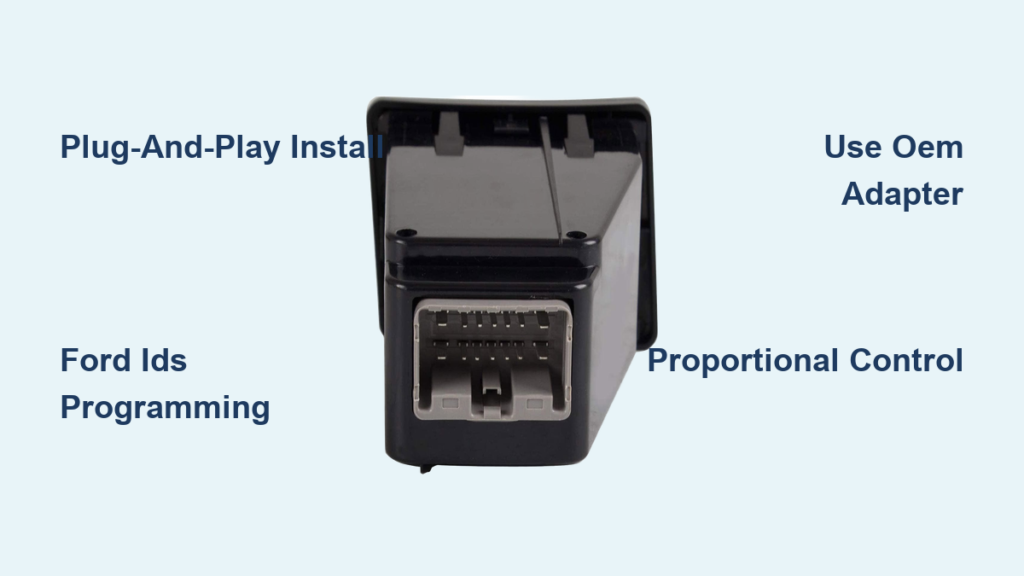
If you own a Ford F-250 and tow heavy trailers, a properly installed brake controller isn’t optional. It’s essential for safety and control. Yet many owners hit roadblocks when trying to install one, especially if their truck didn’t come with the factory controller. The good news? Most F-250s from 2011 to 2022 are pre-wired for a brake controller, meaning the hard part (running wires) is already done. What’s left is selecting the right controller, making the physical connection, and programming the truck’s computer to recognize it.
Whether you’re retrofitting the OEM Ford proportional controller or installing an aftermarket unit like the Tekonsha Prodigy, this guide walks you through every step. You’ll learn how to avoid costly dealership markups, identify the correct parts, and get your system working without splicing a single wire. If you’ve been told your truck can’t support a brake controller or quoted $600 for installation, this guide proves otherwise. By the end, you’ll know exactly what tools, parts, and programming steps are required to complete your F250 brake controller install safely and affordably.
Factory Retrofit: Plug-and-Play Setup

For 2011–2022 F-250s with the factory tow package, adding the OEM brake controller is a plug-and-play process if you have the right components. These trucks come with hidden connectors and pre-routed wiring, eliminating the need for cutting or splicing. The key is knowing which parts to buy and understanding that programming is mandatory.
Identify Pre-Wired Dashboard Connector
Start by removing the lower dashboard cubby (IP bin) on the driver’s side. Look for a blank cavity or unused connector near the steering column. On 2011 models, this is where the BC3Z-2C006-B TBC module plugs in directly. Later models use a similar setup with no wires to trace and no harness to build. If your truck has the tow package, the wiring runs from this point to the ABS module and brake light switch, all factory-sealed.
Visual Cue: You’ll see a rectangular plastic housing with empty terminals. This is your brake controller port.
Install OEM Module and IP Bin
Once the cubby is out, snap the OEM brake controller into place using the correct 8C3Z-2513546-CA IP bin housing. This holds both the unit and the trim panel securely. Align the electrical connector and press firmly until it clicks. Reinstall any screws or clips removed during disassembly.
Pro Tip: Use gloves to avoid scratching the dash. Misaligned clips can cause rattles later.
Connect OEM Wiring Harness
The factory harness connects between the brake controller and two key points:
– One end plugs into the ABS module, usually near the master cylinder
– The other links to the brake light switch under the dash
This harness is sold separately and must match your model year. When connected, power, ground, and brake signal are all handled automatically with no manual wiring needed.
Programming Required: Flash the System
Physical installation alone won’t activate the brake controller. The truck’s instrument cluster must be reprogrammed to enable the feature. Without this step, the unit will remain dead even if everything is plugged in correctly.
Use Ford IDS Diagnostic Tool
Only Ford IDS (Integrated Diagnostic System) can flash the software. This is not a generic OBD2 scanner. It’s Ford’s proprietary tool used at dealerships and by certified technicians.
Warning: Third-party tools like Forscan or Autel cannot perform this programming.
Find Affordable Programming Service
While dealers may quote $600 total, independent shops often charge under $100 for the flash. Call around and ask: “Can you program a factory brake controller on a Super Duty with IDS?” Bring only the module if allowed, since some shops charge less for bench programming.
Success Strategy: Buy parts online through eBay or RockAuto, install yourself, then pay only for programming.
Confirm Activation After Flash
After programming, follow these steps:
1. Turn the ignition to RUN (do not start the engine)
2. Press the brake pedal
3. Watch the controller display; it should light up and respond
If nothing happens, double-check connections and ensure the correct TBC module was programmed for your VIN.
Aftermarket Option: Tekonsha Prodigy Install

If you prefer an aftermarket solution or can’t source OEM parts, the Tekonsha Prodigy P3 is a top-tier proportional controller that works seamlessly with F-250s equipped with the tow package.
Use Tow Package Adapter Cable
No splicing required if you use the correct Ford F-250 tow package adapter (e.g., 22266). This harness plugs directly into the factory tow connector behind the driver’s side fuse box. One end connects to the truck’s wiring, while the other links to the Prodigy’s pigtail.
Avoid Splicing: Even experienced DIYers risk damaging circuits. Stick to plug-and-play adapters.
Mount Controller Near Steering Column
Choose a spot within clear view, typically just above the brake pedal. Use the included bracket and screws to secure the Prodigy. Avoid blocking air vents or pedal movement.
Mounting Tip: Angle the display slightly upward for easier viewing while driving.
Wire Connections (If Adapter Not Used)
In rare cases where no adapter exists:
– Red Wire: Tap into a switched 12V source (ignition-on only)
– Black Wire: Bolt to clean metal frame (remove paint for solid contact)
– White Wire: Connect to brake light switch wire (activates when pedal pressed)
– Blue Wire: Route to trailer connector (this sends power to trailer brakes)
Insulate all splices with heat shrink tubing, not electrical tape.
Diagnose Indicator Light Behavior
After installation, test the system thoroughly. The brake controller should respond immediately when braking.
No Display on Startup
- Check fuse: Look for blown “Trailer Brake” or “Accessory” fuses
- Verify power: Use a multimeter to test voltage at red wire (should be ~12V with key on)
- Inspect ground: Clean mounting surface or add dedicated ground strap
Delayed or Weak Braking Response
- Adjust gain/sensitivity on the controller
- Confirm trailer brakes are adjusted and magnets are functional
- For OEM units: Re-flash may be needed if settings reset
Intermittent Operation
- Secure all wires with zip ties, since loose bundles can short
- Check connector pins for corrosion or bending
- Test trailer wiring harness independently
Choose Proportional Over Time-Delayed

Not all brake controllers are equal. Your choice affects safety, comfort, and trailer control.
Why Proportional Is Superior
Proportional controllers (like OEM Ford or Tekonsha Prodigy) measure your truck’s deceleration and apply trailer brakes in sync. This means:
– Smooth stops, even on hills
– No jerking or skidding
– Automatic adjustment based on braking force
Real-World Benefit: Towing a 10,000-lb trailer feels stable and predictable.
Avoid Time-Delayed Controllers
Units priced around $60 are usually time-delayed. They apply trailer brakes after a fixed delay, leading to:
– Harsh, sudden braking
– Poor performance under variable loads
– Increased wear on trailer brake components
Warning: These are unsafe for heavy or frequent towing.
Identify Controller Type Visually
- OEM Ford Unit: Smooth dial, labeled “Brake Control,” blue backlight
- Tekonsha Prodigy: Digital screen, multiple settings, sleek black face
- Time-Delayed Models: Often bulky, with analog dials and no digital feedback
Source Parts Without Dealer Markup
You don’t need to buy everything at the dealership. Smart sourcing saves hundreds.
Buy OEM Components Online
Search eBay or RockAuto for:
– TBC Module BC3Z-2C006-B (~$150–$200)
– IP Bin 8C3Z-2513546-CA (~$50)
– Factory Wiring Harness (~$75)
Verify Compatibility: Match part numbers exactly to your model year.
Compare Aftermarket Pricing
| Controller | Type | Price | Best For |
|---|---|---|---|
| OEM Ford | Proportional | $240 | Factory integration, clean look |
| Tekonsha Prodigy P3 | Proportional | $220 | DIY ease, advanced tuning |
| Redarc Tow-Pro | Proportional | $400 | High-end performance |
| Generic Brand | Time-Delayed | $60 | Light, occasional use only |
Bottom Line: Spend more upfront for better safety and resale value.
Complete Final Testing Steps
Before hitting the highway, validate your F250 brake controller install with real-world checks.
Perform Bench Test
With ignition on:
1. Press brake pedal; controller should activate instantly
2. Slide manual override lever; trailer brakes should engage audibly
3. Adjust gain to midpoint and verify smooth response
Road Test in Safe Area
Drive at 5–10 mph in an empty parking lot with trailer attached:
– Apply brakes gently and firmly
– Listen for humming or dragging from trailer wheels
– Ensure no dashboard warning lights appear
Safety Check: Stop completely and inspect trailer brake drums for even heat.
Calibrate for Trailer Load
Use the calibration mode (on OEM or Prodigy) to match your trailer weight:
1. Enter calibration
2. Apply brakes fully
3. Wait for confirmation beep or light
Repeat if towing different trailers.
Frequently Asked Questions About F250 Brake Controller Install
Do all F-250s come pre-wired for a brake controller?
Most 2011–2022 F-250s with the factory tow package come pre-wired with a hidden connector behind the dashboard cubby and pre-routed wiring to the ABS module and brake light switch. Trucks without the tow package may require additional wiring work.
Can I install a brake controller without Ford IDS programming?
If you’re installing an aftermarket unit like the Tekonsha Prodigy with a tow package adapter, no programming is needed. However, factory OEM retrofits require Ford IDS to flash the instrument cluster, or the controller won’t activate.
How much does a brake controller install cost at a dealership?
Dealerships often quote around $600 for the full job, including parts and labor. By buying OEM parts online (~$275 total) and hiring an independent shop for programming (under $100), you can complete the same job for roughly half that price.
What’s the difference between proportional and time-delayed controllers?
Proportional controllers mirror your truck’s deceleration for smooth, synced braking. Time-delayed controllers apply trailer brakes after a fixed delay, causing jerky stops. Proportional units cost more ($200–$300) but are far safer for heavy towing.
Can I splice wires if I don’t have an adapter?
Splicing is possible but not recommended. It risks damaging vehicle circuits and voiding warranty coverage. Plug-and-play adapters like the 22266 harness eliminate this risk and take minutes to install.
Where is the brake controller connector located on an F-250?
The connector sits behind the lower dashboard cubby (IP bin) on the driver’s side, near the steering column. Removing the cubby reveals a rectangular plastic housing with empty terminals ready for the TBC module.
Key Takeaways for Your F250 Brake Controller Install
Installing a brake controller on your F-250 doesn’t require rewiring the truck or paying dealer prices. With the right parts and access to Ford IDS programming, you can add a factory proportional system for under $300. Aftermarket options like the Tekonsha Prodigy offer plug-and-play simplicity and precise control without the programming step. The key is avoiding time-delayed units, securing all wiring with zip ties, and never skipping the IDS flash on OEM retrofits. Once complete, you’ll enjoy safer, smoother stops every time you tow. Start by sourcing your parts online today, then schedule programming with an independent shop to finish the job affordably.


