
A dead battery or daylight saving time change often leaves your dashboard display stuck at 12:00. Knowing how to set clock on Ford F350 models quickly restores your schedule without needing a mechanic.
This guide provides exact steps for 1997 through 2015 trucks based on your specific radio type. You will learn to identify your system, adjust hours and minutes, and fix common reset issues permanently.
Identify Your F-350 Radio Generation
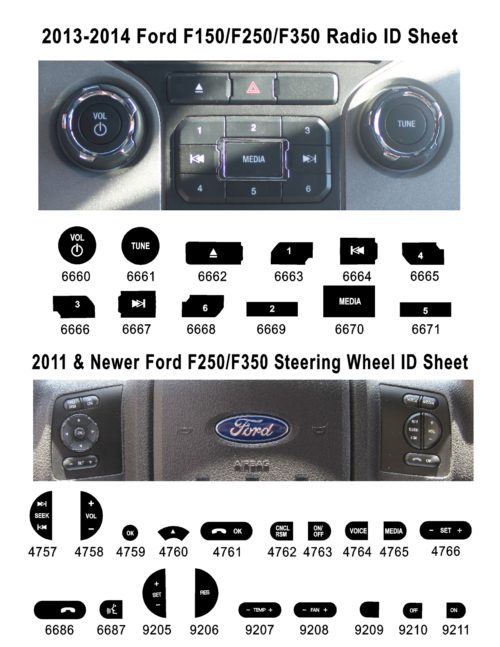
Determining your truck’s model year and control layout is the first step to success. The method for setting the time changes completely between the older button-based systems and newer menu-driven interfaces. Using the wrong technique will result in frustration and no time change.
Check Model Year and Control Layout
Your truck falls into one of two distinct categories based on its production date and button configuration.
- 1997–2005 Models: These units feature physical buttons labeled CLK, TUNE, and SEEK. You set the time by pressing these buttons in a specific sequence.
- 2005–2015 Models: These newer systems include a Menu button and a central rotary selector knob. Time adjustment happens through a digital menu interface.
Locate Key Buttons on the Dash
Visually inspect your radio faceplate to confirm which controls you have before starting.
- On older units, find the CLK button on the far left side near the tuning controls.
- On newer systems, look for the Menu button and a large Selector Knob in the center. Some trims allow access via steering wheel controls.
If your display shows strange text like “Sick” or “Tuned” during setup, you definitely have a 1997–2005 model. These are normal system messages and not errors.
Set Clock on 1997–2005 F-350 Models

This procedure applies specifically to classic Ford F-350 trucks equipped with dedicated function buttons. The process relies on precise timing and a strict button sequence to enter setup mode.
Turn Ignition On and Radio Off
Ensure your key is in the ON position so the radio receives power. The engine does not need to run, but electrical systems must be active. Crucially, the radio must be powered OFF before you begin. If the radio is on, the buttons control volume or station tuning instead of the clock.
Press and Hold the CLK Button
Locate the CLK button on the left side of the radio face. Press and hold this button firmly for a few seconds. The display will change, and the current hour will begin to flash or appear in a modified format. This visual cue confirms you have successfully entered clock setup mode.
Pro Tip: If the display does not change, verify the radio is completely off. Many users fail this step because the audio is still playing.
Adjust Hours Using the CLK Button
Once the system is in setup mode, press the CLK button repeatedly to increase the hour. Each single press advances the time by one hour. There is no button to decrease the value, so you must press until the display loops around to your correct hour. The system handles AM and PM automatically.
Set Minutes with TUNE or SEEK Buttons
After you set the hour, the system automatically shifts focus to the minutes. Use the TUNE button on most models or the SEEK button on some variants to increment the minute value. Press once for every minute you need to add.
Note: Functionality varies slightly by trim level. Try the TUNE button first, then SEEK if the first does not work.
Release Buttons to Save Automatically
When the correct time appears on the screen, simply release all buttons. The system saves your settings automatically and returns to the normal display mode. No confirmation button is required for these older models.
Understand Display Messages
- “Sick” may appear on the screen for up to 4 hours. This is normal behavior.
- “Tuned” may flash for about 4 minutes. This is also an expected internal indicator.
These text strings are placeholder messages and do not indicate a malfunction in your radio unit.
Set Clock on 2005–2015 F-350 Models

Newer F-350 trucks utilize a more intuitive menu-driven interface. This system requires navigating through settings using a rotary selector knob rather than repetitive button pressing.
Activate System with Ignition On
Turn your key to the ON position. The engine can be off or running, provided the electrical system is active. Just like the older models, the radio must be OFF before you start. If the audio is playing, turn it off first to access the menu.
Press Menu Button to Enter Setup
Press the Menu button located on the radio face. This action activates the clock adjustment mode and brings up the settings screen. The display will show the current hour, indicating it is ready for editing.
Steering Wheel Option: On certain trims, you can access the Menu button directly from the steering wheel controls.
Rotate Knob to Set Hours
Use the Selector Knob to adjust the hour value. Turn the knob left to decrease the number or right to increase it. This smooth scrolling action allows you to reach the correct hour much faster than pressing a button repeatedly.
Switch Focus to Minutes
Press the Menu button again to shift the active selection. The highlight on the display will move from the hours section to the minutes section. The same rotary knob now controls the minute adjustment.
Confirm and Save Time Settings
After setting the minutes to the correct value, press the Menu button one final time. This step confirms your input, saves the new time, and exits the setup mode. Unlike older models, this manual save step is mandatory.
Warning: If you turn the radio on or exit the menu without pressing Menu, your changes will be lost.
Fix Persistent Clock Reset Issues
If your F-350 clock keeps resetting to 12:00 after you turn the truck off, you have a power interruption issue. Both radio generations require constant low-voltage power to retain memory settings.
Check Battery Health and Voltage
A weak or failing battery often causes voltage drops that wipe the radio memory. If the clock resets even without disconnecting the battery, test your battery’s charge level and age immediately.
Inspect Fuses and Connections
- Locate the radio memory fuse in your fuse box using the owner’s manual.
- Look for any loose, corroded, or blown fuses that might interrupt power.
- Check battery terminals for corrosion and tighten them if they feel loose.
Expert Note: Even a brief disconnection during a jump-start can wipe the clock memory on these trucks.
Avoid Common Setup Mistakes
Many truck owners struggle with this task because they overlook small but critical details in the procedure.
Ensure Radio Is Powered Off
This is the number one error users make. If the radio is on, the CLK or Menu buttons perform audio functions. Always turn the radio OFF first to access time settings.
Do Not Panic Over Placeholder Text
On 1997–2005 models, seeing “Sick” or “Tuned” is completely normal. Do not turn off the system or restart the truck thinking the radio is broken.
Complete All Steps for Newer Models
On 2005–2015 models, you must press Menu to save. Skipping this final step means the system discards your changes. The newer interface does not auto-save like the older buttons.
Adjust for DST and Time Zone Travel
Neither generation of F-350 radio automatically adjusts for daylight saving time or geographic time zones. You must handle these changes manually.
Manual Daylight Saving Time Update
Twice a year, repeat the full clock setup process to move the time forward or back one hour. It is best to set this the night before the change to avoid morning confusion.
Update Time Zone When Traveling
When driving across time zones, re-enter the local time using the same method described for your model. These factory radios do not have GPS sync capabilities to update automatically.
Battery Replacement and Clock Reset
After replacing or disconnecting the vehicle battery, expect the clock to reset to its default state, usually 12:00.
Re-Enter Time Immediately
As soon as the engine starts and electrical power returns, follow the steps for your specific model to re-set the clock. Keep this guide accessible in your glove box for quick reference during maintenance.
Pro Tip: Write down the current time on a piece of paper before disconnecting the battery to speed up the re-entry process.
Compare Both Clock Systems
Understanding the differences between the two generations helps you act faster and avoid confusion during setup.
Button Versus Knob Control
- 1997–2005: Uses CLK, TUNE, and SEEK buttons with an incremental press system.
- 2005–2015: Uses Menu and Selector Knob for smooth, scroll-based input.
Saving Methods Differ Significantly
- Older Models: Settings save automatically when you release the buttons.
- Newer Models: Settings require a manual save via a final Menu press.
Display Feedback Variations
- 1997–2005: May show odd messages like “Sick” and “Tuned”.
- 2005–2015: Features a clean display with no strange text artifacts.
Use the table below to quickly identify your system and method:
| Feature | 1997–2005 | 2005–2015 |
|---|---|---|
| Activate With | Hold CLK | Press Menu |
| Adjust Hours | Press CLK | Rotate Knob |
| Adjust Minutes | TUNE/SEEK | Rotate Knob |
| Save Method | Auto | Press Menu |
| Odd Messages? | Yes | No |
Frequently Asked Questions About Ford F350 Clock Settings
Why does my Ford F350 clock keep resetting?
Your clock likely resets due to a weak battery, loose terminal, or blown fuse interrupting power to the radio memory. Both generations require constant low-voltage power to retain time settings when the truck is off.
What do “Sick” and “Tuned” mean on my 1999 F350 display?
These are normal placeholder indicators for 1997–2005 models during clock setup. “Sick” may appear for four hours and “Tuned” for four minutes. They are not errors and do not require repair.
How do I set the clock if I have a 2010 Ford F350?
Turn the ignition on with the radio off, press the Menu button, and use the Selector Knob to adjust hours and minutes. You must press the Menu button one final time to save your changes on this model.
Does the Ford F350 clock adjust for Daylight Saving Time automatically?
No, neither the 1997–2005 nor the 2005–2015 F-350 radio systems have automatic daylight saving time adjustment. You must manually update the time twice a year using the setup procedures.
Can I set the clock without starting the engine?
Yes, you only need to turn the ignition key to the “ON” position. The engine does not need to run, but the electrical system must be active to power the radio display.
What button sets the time on a 2004 Ford F350?
On a 2004 model, press and hold the CLK button to enter setup mode. Use the CLK button to adjust hours and the TUNE or SEEK button to adjust minutes.
Key Takeaways for Setting Your Ford F350 Clock
Setting the clock on your Ford F-350 is a quick task once you identify whether you have the older button system or the newer menu interface. Remember that the radio must always be off to access setup mode, and newer models require a final menu press to save. If your time keeps resetting, check your battery and fuses rather than blaming the radio itself.
Keep these steps handy for your next battery change or daylight saving time adjustment. With the correct method for your specific model year, you can ensure your dashboard always displays the right time.


